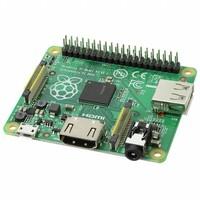


Hi readers! Hopefully, you are doing great and finding and learning new exciting things daily. Today, our topic is Raspberry Pi 1, introduced in February 2012 by The Raspberry Foundation. It was the first-generation single-board computer. It was mainly designed for student and educational purposes to promote the study of computer science.
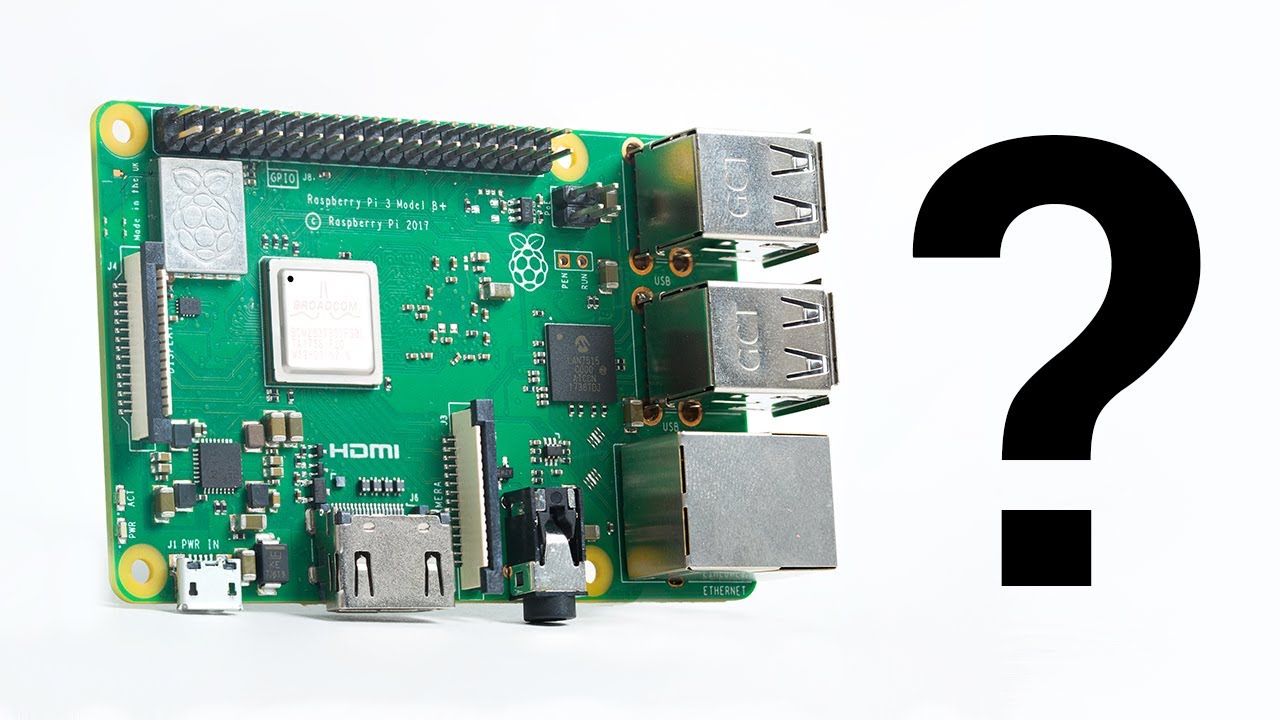
Get Started with Raspberry Pi 1 - Unboxing Pi
Introduction
Engineers and educators like Eben Upton started the Raspberry Pi Foundation when they observed that students could not perform programming and coding due to the high prices of computers. In the 1980s people used machines like BBC Micro and Commodore 64 for programming but they were accessible to students. It was difficult for beginners to improve old computers, also traditional computers were expensive, which limited the tools for programming and learning. To overcome these problems, engineers laid the foundation of Raspberry Pi, as many students were getting into computer science.
Their main focus was to make a compact, low-cost, and fast computer that would be easily accessible to students to learn programming and coding. They introduced their Model A at 25$ and Model B at 35$. It was a good starting point to understand hardware and programming by beginners, students, learners, and hobbyists. It has vast applications in media centers, IoT projects, retro gaming, robotics, and web servers.
In this article, we will learn about Pi 1’s introduction, features and specifications, datasheet, pinouts, applications, impact, and limitations. Let’s uncover the insights.
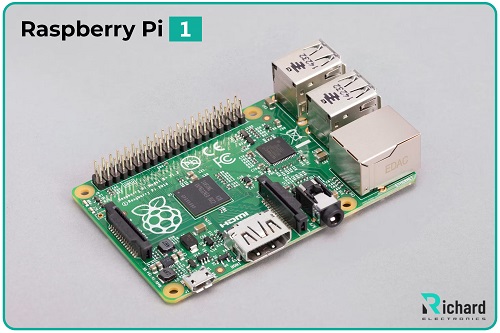
● The Raspberry Pi was introduced in 2012, February.
● Pi 1 uses a Broadcom BCM2835 chip to operate a computer.
● It contains an ARM1176JZF-S CPU designed based on ARMv6 architecture.
● It runs at a clock speed of 700 MHz smoothly.
● Raspberry Pi 1 offers 256 MB RAM in model A and 512 MB in model B.
● Pi 1 supports an SD card slot to enhance storage
● It requires 0.5W to 3W power to function smoothly.
● Power is supplied by using 5V micro-USB.
● It has 4 USB ports to enhance its efficiency.
● Pi 1 contains 40 GPIO pins that offer flexibility.
● Raspberry Pi 1 was specially designed for students and learners.
● It can easily perform light tasks like web browsing, basic programming, and running Linux distributions.
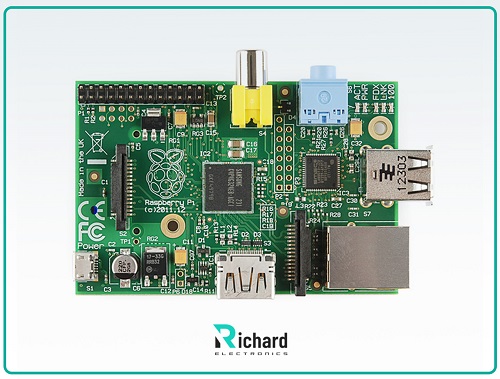
Raspberry Pi 1 Specifications:
Processor:
Raspberry Pi contains Broadcom BCM2835 system-on-chip (SoC) to operate a computer. This is a single-core processing board. This board is designed on the basis of ARMv6 architecture. It is used to enhance the performance of lightweight and simple tasks including web browsing, coding, and perfectly run basic applications.
It operates at the clock speed of 1 GHz and allows proper cooling. This boosts the efficiency of the computer. It was the first board, not compatible with modern software.
Graphics Processing Unit:
VideoCore IV GPU:
The Raspberry Pi 1 has a VideoCore IV GPU, which allows popular media codecs like H.264 for efficient and smooth streaming of video and playback. At 30 frames per second, it supports hardware acceleration for 1080p HD video playback. It is required in applications that handle graphical interfaces, and simple 3D rendering tasks and is perfect for lightweight gaming.
OpenGL ES 2.0 Support:
It is used for simple and basic 3D graphics programming and applications with smooth performance.
Memory:
The Raspberry Pi 1’s memory varies with its different models.
● Model A: contains 256 MB RAM.
● Model B: In the beginning, it was 256 MB RAM, but it was improved to 512 MB.
● Model B+: has 512 MB RAM.
It was the perfect RAM to run basic operations and applications, used to run lightweight operating systems and perform basic tasks efficiently.
SD Card Slot:
Pi 1 contains an SD card slot to enhance its storage capacity externally and act as a primary boot. This is a flexible design so that users by just swapping a SD card could easily switch operating systems. SD card enhances its storage capacity up to 32 GB, depending upon the operating system.
Input and Output Ports:
The Raspberry Pi contains various input-output ports that allow broad connectivity and functionality.
USB Port:
Different models have different numbers of ports.
● Model A: contains 1 USB 2.0 port.
● Model B: offers 2 USB 2.0 ports.
● Model B+: contains 4 USB 2.0 ports for high performance.
These USB ports are used to connect boards with different peripheral devices including keyboards, mice, Wi-Fi dongles, and USB storage devices. The Model B+ was modified to enhance its versatility and efficiency, reducing the need for external USB hubs.
Ethernet:
● Model A: it has no Ethernet connection.
● Model B and B+: contain a 10/100 Mbps Ethernet port that allows to connect internet by using wire. These features make them for networking applications.
HDMI and Composite Video Output:
It allows both input and output video output:
● HDMI output: makes Pi 1 compatible with modern monitors and TVs by allowing resolutions up to 1920x1200.
● Composite video output: it is available using an RCA jack, and supports connection to older displays.
3.5mm Audio Jack:
It contains a 3.5mm stereo audio jack, which allows to connect headphones or speakers. It can also transmit audio using HDMI for higher-quality sound.

GPIO Pins:
The Raspberry Pi 1 contains various GPIO pins that are crucial for hardware projects.
● Model A and B: both these models contain 26 GPIO pins.
● Model B+: modified to 40 GPIO pins to enhance its efficiency and performance. It allows more options to interface with external devices.
GPIO pins allow communication protocols like I2C, SPI, and UART. This feature makes Pi 1 ideal for electronics, robotics, and IoT projects.
Dimensions:
It has a form factor of 85.6mm x 56mm x 21mm, a credit-card-sized board can be easily embedded into projects. Its compact size makes it ideal for portable projects and applications.
Model B+ is 85.6mm x 56.5mm x 17mm.
Power and Energy Efficiency:
It consumes low power to operate function.
● Power supply: Power is provided using a 5V micro-USB port.
● Power draw: Ranged from 0.5W to 3W, depending on the model and usage.
The Model B+ was modified with improved power management. It supplies power to more USB peripherals without the need for an external powered hub. This makes it ideal for battery-operated devices and sensitive applications.
Operating System Support:
The SD card slot enhances its performance and allows it in various lightweight operating systems:
● Raspbian (now Raspberry Pi OS): A Debian-based Linux distribution improved for the Raspberry Pi.
● Other Linux distributions: Arch Linux ARM, Debian, and more.
● OpenELEC for media center applications.
● RetroPie for gaming, and others.
Low cost:
Pi 1 is specially designed for students and learners so it can be easily accessible to them. It is affordable instead of to traditional programming computers.
● Model A: Priced at $25.
● Model B: Priced at $35.
Datasheet of Raspberry Pi 1:
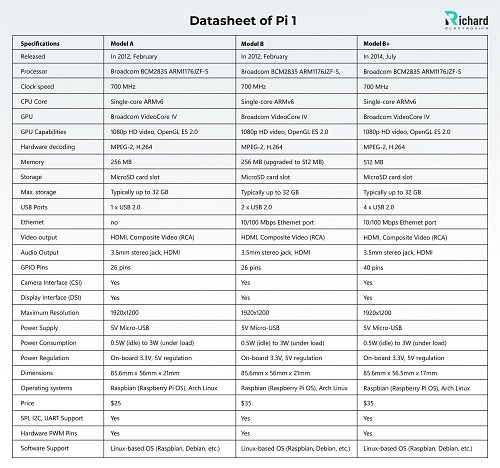
Specifications | Model A | Model B | Model B+ |
Released | In 2012, February | In 2012, February | In 2014, July |
Processor | Broadcom BCM2835 ARM1176JZF-S | Broadcom BCM2835 ARM1176JZF-S, | Broadcom BCM2835 ARM1176JZF-S |
Clock speed | 700 MHz | 700 MHz | 700 MHz |
CPU Core | Single-core ARMv6 | Single-core ARMv6 | Single-core ARMv6 |
GPU | Broadcom VideoCore IV | Broadcom VideoCore IV | Broadcom VideoCore IV |
GPU Capabilities | 1080p HD video, OpenGL ES 2.0 | 1080p HD video, OpenGL ES 2.0 | 1080p HD video, OpenGL ES 2.0 |
Hardware decoding | MPEG-2, H.264 | MPEG-2, H.264 | MPEG-2, H.264 |
Memory | 256 MB | 256 MB (upgraded to 512 MB) | 512 MB |
Storage | MicroSD card slot | MicroSD card slot | MicroSD card slot |
Max. storage | Typically up to 32 GB | Typically up to 32 GB | Typically up to 32 GB |
USB Ports | 1 x USB 2.0 | 2 x USB 2.0 | 4 x USB 2.0 |
Ethernet | no | 10/100 Mbps Ethernet port | 10/100 Mbps Ethernet port |
Video output | HDMI, Composite Video (RCA) | HDMI, Composite Video (RCA) | HDMI, Composite Video (RCA) |
Audio Output | 3.5mm stereo jack, HDMI | 3.5mm stereo jack, HDMI | 3.5mm stereo jack, HDMI |
GPIO Pins | 26 pins | 26 pins | 40 pins |
Camera Interface (CSI) | Yes | Yes | Yes |
Display Interface (DSI) | Yes | Yes | Yes |
Maximum Resolution | 1920x1200 | 1920x1200 | 1920x1200 |
Power Supply | 5V Micro-USB | 5V Micro-USB | 5V Micro-USB |
Power Consumption | 0.5W (idle) to 3W (under load) | 0.5W (idle) to 3W (under load) | 0.5W (idle) to 3W (under load) |
Power Regulation | On-board 3.3V, 5V regulation | On-board 3.3V, 5V regulation | On-board 3.3V, 5V regulation |
Dimensions | 85.6mm x 56mm x 21mm | 85.6mm x 56mm x 21mm | 85.6mm x 56.5mm x 17mm |
Operating systems | Raspbian (Raspberry Pi OS), Arch Linux | Raspbian (Raspberry Pi OS), Arch Linux | Raspbian (Raspberry Pi OS), Arch Linux |
Price | $25 | $35 | $35 |
SPI, I2C, UART Support | Yes | Yes | Yes |
Hardware PWM Pins | Yes | Yes | Yes |
Software Support | Linux-based OS (Raspbian, Debian, etc.) | Linux-based OS (Raspbian, Debian, etc.) | Linux-based OS (Raspbian, Debian, etc.) |
Raspberry Pi 1 Pinouts:

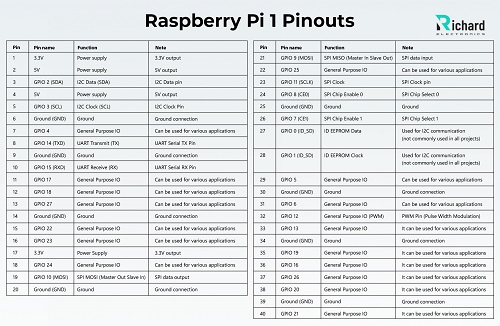
Pin | Pin name | Function | Note |
1 | 3.3V | Power supply | 3.3V output |
2 | 5V | Power supply | 5V output |
3 | GPIO 2 (SDA) | I2C Data (SDA) | I2C Data pin |
4 | 5V | Power supply | 5V output |
5 | GPIO 3 (SCL) | I2C Clock (SCL) | I2C Clock Pin |
6 | Ground (GND) | Ground | Ground connection |
7 | GPIO 4 | General Purpose IO | Can be used for various applications |
8 | GPIO 14 (TXD) | UART Transmit (TX) | UART Serial TX Pin |
9 | Ground (GND) | Ground | Ground connection |
10 | GPIO 15 (RXD) | UART Receive (RX) | UART Serial RX Pin |
11 | GPIO 17 | General Purpose IO | Can be used for various applications |
12 | GPIO 18 | General Purpose IO | Can be used for various applications |
13 | GPIO 27 | General Purpose IO | Can be used for various applications |
14 | Ground (GND) | Ground | Ground connection |
15 | GPIO 22 | General Purpose IO | Can be used for various applications |
16 | GPIO 23 | General Purpose IO | Can be used for various applications |
17 | 3.3V | Power Supply | 3.3V output |
18 | GPIO 24 | General Purpose IO | Can be used for various applications |
19 | GPIO 10 (MOSI) | SPI MOSI (Master Out Slave In) | SPI data output |
20 | Ground (GND) | Ground | Ground connection |
21 | GPIO 9 (MOSI) | SPI MISO (Master In Slave Out) | SPI data input |
22 | GPIO 25 | General Purpose IO | Can be used for various applications |
23 | GPIO 11 (SCLK) | SPI Clock | SPI Clock pin |
24 | GPIO 8 (CE0) | SPI Chip Enable 0 | SPI Chip Select 0 |
25 | Ground (GND) | Ground | Ground |
26 | GPIO 7 (CE1) | SPI Chip Enable 1 | SPI Chip Select 1 |
27 | GPIO 0 (ID_SD) | ID EEPROM Data | Used for I2C communication (not commonly used in all projects) |
28 | GPIO 1 (ID_SD) | ID EEPROM Clock | Used for I2C communication (not commonly used in all projects) |
29 | GPIO 5 | General Purpose IO | Can be used for various applications |
30 | Ground (GND) | Ground | Ground connection |
31 | GPIO 6 | General Purpose IO | Can be used for various applications |
32 | GPIO 12 | General Purpose IO (PWM) | PWM Pin (Pulse Width Modulation) |
33 | GPIO 13 | General Purpose IO | It can be used for various applications |
34 | Ground (GND) | Ground | Ground connection |
35 | GPIO 19 | General Purpose IO | It can be used for various applications |
36 | GPIO 16 | General Purpose IO | It can be used for various applications |
37 | GPIO 26 | General Purpose IO | It can be used for various applications |
38 | GPIO 20 | General Purpose IO | It can be used for various applications |
39 | Ground (GND) | Ground | Ground connection |
40 | GPIO 21 | General Purpose IO | It can be used for various applications |
Applications of Raspberry Pi 1:
Educational Tool:
Pi 1 allows students to learn and understand hardware programming and coding. It is more easily accessible to students than expensive computers.
Home Automation (IoT):
Pi is simple and has many applications in home automated devices to control lights and security systems.
Personal Web Server:
It is compatible with software like Apache or Nginx as a web server to host personal websites or blogs. It helps students to deploy websites using PHP, HTML, and CSS.
Robotics and DIY Projects:
It is famous in robotics. It is budget-friendly, and used by hobbyists to make various projects.
Conclusion:
The Raspberry Pi 1 is highly affordable, as it is mainly designed for students. Its processor with RAM allows students to learn and understand hardware programming and coding. Its features including 40-GPIO pins, memory, and flexibility make it best suited for students, educational, personal, and experimental projects. It requires 0.5W to 3W power to function smoothly and runs lightweight web servers.
Pi 1 supports network connectivity and has USB ports to enhance its performance. The SD card slot is introduced to extend its storage range. It was a good starting point to understand hardware and programming by beginners, students, learners, and hobbyists. It has vast applications in media centers, IoT projects, retro gaming, robotics, and web servers.
Specifications
Technical Specifications
- TypeParameterSelect All
Factory Lead Time
3 Weeks
Mounting Type
Fixed
Published
2016
Part Status
Active
Moisture Sensitivity Level (MSL)
Not Applicable
Type
MPU
Core Processor
ARM11, VideoCore
Utilized IC / Part
BCM2835
Contents
Board(s)
Board Type
Single Board Computers (SBC)
Platform
Raspberry Pi Model A+
RoHS Status
Non-RoHS Compliant
Datasheet PDF
- 1.
What are the power requirements of the Raspberry Pi 1?
The Raspberry Pi 1 requires 0.5W to 3W power to function smoothly and gets power supplied by using 5V micro-USB.
- 2.
What is the difference in RAM between Raspberry Pi 1 Model A and Model B?
Model A of Raspberry Pi 1 contains 256 MB RAM while Model B initially had 256 MB (later improved to 512 MB).
 Ling Tianhao
Ling Tianhao, with 20 years in R&D, has developed his skills at one of America's top ten chip manufacturers.His expertise goes beyond chip design and quality control, showing a strong understanding of PCB technology. His comprehensive knowledge of microchip and PCB technologies establishes him as a versatile professional in the semiconductor industry, driving advancements and solving complex problems.