Key Takeaways
Follow the correct RJ45 color code (T568A or T568B) on both ends to ensure a stable network connection.
Use the right tools like a cable stripper, crimping tool, and cable tester to make wiring easier and more reliable.
Keep wire pairs twisted and trim wires evenly to reduce interference and ensure good contact inside the connector.
Insert wires fully into the RJ45 connector and crimp firmly to avoid loose connections and signal loss.
Always test your cable with a cable tester before use to catch mistakes early and fix them for a smooth network.
RJ45 Colour Code Standards
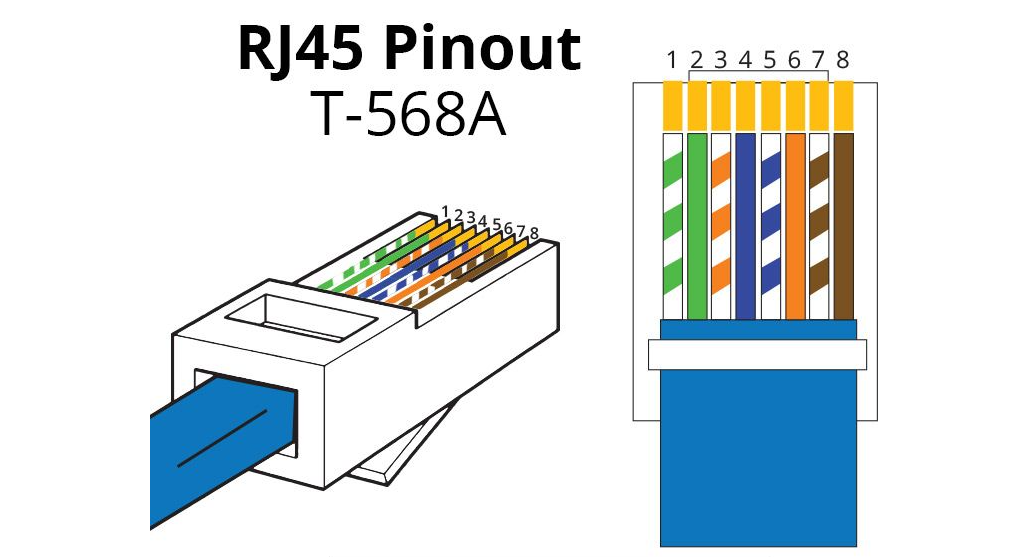
When you wire an RJ45 connector, you need to follow a specific rj45 colour code. This code ensures that your network cables work with all modern devices and deliver the best possible performance. Two main wiring standards exist: T568A and T568B. Both use the same eight wire colors, but the order changes slightly. Using the correct color code prevents connection errors and keeps your network running smoothly.
Here is a table showing the wire color order for both T568A and T568B from pin 1 to pin 8:
Pin Number | T568A Color | T568B Color |
|---|---|---|
1 | White/Green | White/Orange |
2 | Green | Orange |
3 | White/Orange | White/Green |
4 | Blue | Blue |
5 | White/Blue | White/Blue |
6 | Orange | Green |
7 | White/Brown | White/Brown |
8 | Brown | Brown |
T568A
T568A is one of the two recognized wiring standards for Ethernet cables. You will often see this standard in residential installations and some government projects. The T568A rj45 colour code starts with the white/green wire at pin 1. This arrangement matches older telephone wiring, which can make it easier to upgrade existing systems.
T568B
T568B is the most common wiring standard in the United States. Many commercial networks use this rj45 colour code because it matches older AT&T 258A color schemes. T568B starts with the white/orange wire at pin 1. If you are unsure which standard to use, T568B is usually a safe choice for new installations.
Tip: Always use the same wiring standard on both ends of your cable. Mixing T568A and T568B creates a crossover cable, which only works for specific network setups.
Following the correct rj45 colour code is essential for compatibility and network performance. If you mix up the wires, your cable may not work, or you could experience slow speeds and dropped connections. Modern Ethernet cables, such as Cat5e, Cat6, and Cat6a, support high data rates and long distances only when you wire them correctly. For example, Cat5e cables support up to 1 Gbps over 100 meters, while Cat6a cables can handle 10 Gbps over the same distance. Using the right color code helps you get the most out of your network hardware.
You should also consider the type of cable and connector you use. Shielded cables protect against interference in busy environments, while gold-plated connectors reduce signal loss. These choices, combined with the correct rj45 colour code, ensure your network runs at top speed and stays reliable.
Tools and Materials
Before you start wiring an RJ45 connector, you need to gather the right tools and materials. Having everything ready makes the process smoother and helps you avoid mistakes.
Required Tools
You do not need expensive equipment to wire an RJ45 connector. Most of the tools are easy to find at hardware or electronics stores. Here is a list of what you should have on hand:
Cable Stripper: This tool removes the outer jacket from the Ethernet cable without damaging the wires inside.
Crimping Tool: You use this to attach the RJ45 connector to the cable. A good crimping tool ensures a secure and reliable connection.
Cable Tester: This device checks if your cable works correctly after you finish wiring. It helps you catch wiring mistakes before you use the cable.
Scissors or Wire Cutters: You need these to trim the wires to the correct length.
RJ45 Connectors: These connectors attach to the ends of your Ethernet cable.
Tip: Some crimping tools come with built-in cable strippers and cutters. This feature can save you time and space in your toolkit.
Cable and Connector
You can use standard Ethernet cables such as Cat5e or Cat6 for both T568A and T568B wiring standards. These cables contain eight color-coded wires inside. The most important thing is to follow the correct color order for the standard you choose. Both T568A and T568B work with any standard RJ45 connector, as long as you keep the wiring consistent on both ends.
You do not need a special type of cable or connector for either standard. Cat5e and Cat6 cables support high-speed data transfer and work well for most home and office networks. Standard RJ45 connectors fit these cables and provide a secure connection to your devices. Always check that your cable and connectors match in size and category for the best results.
Wiring Steps
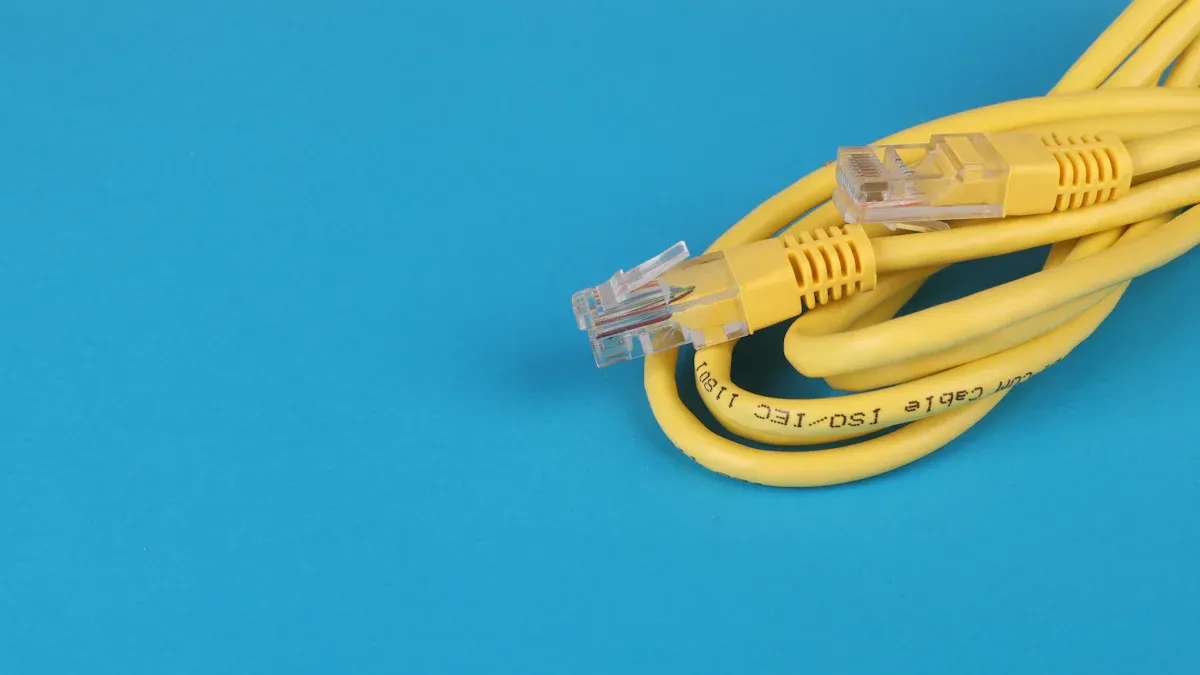
Wiring an RJ45 connector may seem challenging at first, but you can complete the process with patience and attention to detail. Follow these steps to create a reliable Ethernet cable for your network.
Prepare the Cable
Start by measuring the length of cable you need. Use your cable stripper to remove about 1 to 2 inches of the outer jacket from the end of the Ethernet cable. Be careful not to cut into the wires inside. Once you remove the jacket, you will see four twisted pairs of wires. Each pair has a solid color wire and a striped wire. Untwist each pair only as much as needed to separate the wires. Keeping the pairs twisted as close to the jacket as possible helps reduce interference and improves signal quality.
Tip: Do not untwist more than half an inch of each pair. The twists protect your signal from outside noise.
Arrange Wires by Colour Code
Now, arrange the eight wires in the correct order according to the rj45 colour code you have chosen (T568A or T568B). Straighten each wire with your fingers and line them up side by side. Double-check the color sequence before moving on. Hold the wires flat between your thumb and forefinger. Use your wire cutters to trim the ends so that all wires are the same length. This step ensures a clean fit into the RJ45 connector.
Here is a quick reminder of the correct order for each standard:
T568A: White/Green, Green, White/Orange, Blue, White/Blue, Orange, White/Brown, Brown
T568B: White/Orange, Orange, White/Green, Blue, White/Blue, Green, White/Brown, Brown
Note: Always use the same color code on both ends of the cable for a straight-through connection.
Insert and Crimp
Hold the RJ45 connector with the clip facing away from you and pin 1 on the left. Carefully insert the wires into the connector, making sure each wire goes into its own channel. Push the wires in until you feel them reach the end of the connector. Check that the color order matches your chosen standard and that the jacket fits snugly inside the connector. This helps secure the cable and prevents the wires from pulling out.
Place the connector into your crimping tool. Squeeze the handles firmly to crimp the connector onto the cable. The metal pins inside the connector will pierce the insulation of each wire, creating a solid electrical connection.
Alert: If you do not push the wires in all the way, the cable may not work. Always double-check before crimping.
Test the Connection
After crimping, use a cable tester to check your work. Plug each end of the cable into the tester. The device will show if all eight wires connect correctly. If you see any errors, cut off the connector and repeat the process. Testing your cable ensures you have followed the rj45 colour code and that your network will run smoothly.
🛠️ Pro Tip: Always test your cable before installing it in walls or ceilings. Fixing mistakes is much easier at this stage.
Mistakes and Troubleshooting
Common Errors
Wiring an RJ45 connector can seem simple, but small mistakes can cause big problems. You should watch for these common errors:
Incorrect Color Order: Mixing up the rj45 color code is the most frequent mistake. If you do not match the wires to the T568A or T568B standard, your cable will not work.
Insufficient Wire Insertion: Sometimes, the wires do not reach the end of the connector. This can lead to poor contact and unreliable connections.
Untwisting Wires Too Much: If you untwist the pairs too far, you increase the risk of interference. This can slow down your network speed.
Uneven Wire Lengths: Wires that are not trimmed evenly may not all make contact with the connector pins.
Loose Crimping: If you do not squeeze the crimping tool firmly, the connector may not attach securely. This can cause the cable to fail.
Using Damaged Cable: Cuts or nicks in the cable jacket or wires can weaken the signal or stop it completely.
⚠️ Note: Always double-check the color order before you crimp the connector. A quick review can save you time and frustration.
Troubleshooting Tips
If your cable does not work after wiring, you can use these troubleshooting steps:
Test with a Cable Tester
Plug both ends of your cable into a tester. The device will show if each wire connects correctly. If you see a fault, note which pin failed.Inspect the Connector
Look closely at the RJ45 connector. Make sure all wires reach the end and sit in the correct channels. You should see the copper ends through the clear plastic.Check the Color Sequence
Compare your cable to the T568A or T568B chart. If the order does not match, you need to cut off the connector and start again.Examine the Crimp
A good crimp feels solid. If the connector wiggles or pulls off easily, redo the crimping step.Look for Physical Damage
Check the cable for cuts, kinks, or crushed spots. Damaged cables often cause connection issues.
🛠️ Tip: If you find a mistake, do not try to fix just one wire. Cut off the connector, straighten the wires, and repeat the process. This ensures a reliable connection every time.
You ensure a reliable network when you follow each step and use the correct rj45 colour code. Testing your cable after wiring helps you catch mistakes early. Always double-check your work before using the cable. If you run into problems, review this guide or ask for help from a professional. Careful attention to detail gives you the best results for your network.
- 1.
What is the difference between T568A and T568B?
T568A and T568B use the same wire colors but in a different order. Both work for Ethernet cables. T568B is more common in the US. You should use the same standard on both ends for straight-through cables.
- 2.
Can I mix T568A on one end and T568B on the other?
Mixing T568A and T568B creates a crossover cable. You should only do this for specific network setups, like connecting two computers directly. For most home or office networks, use the same standard on both ends.
- 3.
How do I know if my RJ45 cable works?
You can use a cable tester. Plug both ends of your cable into the tester. The device will show if each wire connects correctly. If you see an error, you should rewire the connector.
- 4.
What should I do if my cable fails the test?
1.Check the color order. 2.Make sure all wires reach the end of the connector. 3.Inspect for damage. 4.If you find a mistake, cut off the connector and redo the steps.
- 5.
Do I need special tools to wire an RJ45 connector?
You need a cable stripper, crimping tool, and wire cutters. A cable tester helps check your work. Some crimping tools include built-in strippers and cutters, making the job easier.
View More
 Ling Tianhao
Ling Tianhao, with 20 years in R&D, has developed his skills at one of America's top ten chip manufacturers.His expertise goes beyond chip design and quality control, showing a strong understanding of PCB technology. His comprehensive knowledge of microchip and PCB technologies establishes him as a versatile professional in the semiconductor industry, driving advancements and solving complex problems.

07 May 2026
17 April 2026

02 April 2026
02 April 2026

19 January 2026