
 )
)

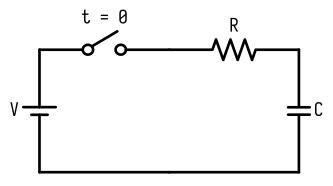
It saves time and avoids mistakes in calculations. For new learners, it gives correct answers without guessing. You can learn circuits better without doing math by hand.
Key Takeaways
Time constant calculators make it easier to find time constants in RC circuits. They save time and help avoid mistakes.
The time constant (τ = R × C) shows how fast a capacitor charges or discharges. This affects how the circuit works.
Picking the right calculator is important. Beginners need simple tools, while experts might want extra features like waveform analysis.
Understanding RC Circuits and the Time Constant
What is an RC circuit?
An RC circuit is a simple setup with a resistor (R) and a capacitor (C). These parts work together to control current and store energy. RC circuits are found in devices like radios, timers, and filters. The resistor slows down the current, while the capacitor holds and releases energy. Together, they help manage signals and timing in electronics.
The basics of the time constant
The time constant, shown as τ (tau), tells how fast an RC circuit reacts to voltage changes. You find it by multiplying resistance (R) and capacitance (C):
τ = R × C
For instance, if the resistor is 47k ohms and the capacitor is 1000 µF, the time constant equals 47 seconds. The table below explains this:
| Resistance (R) | Capacitance (C) | Time Constant (τ) |
|---|---|---|
| 47k ohms | 1000 µF | 47 seconds |
| N/A | N/A | 99.3% charge after 5τ |
Why the time constant matters in circuits
The time constant helps you understand how RC circuits work. It shows how fast a capacitor charges to 63% of its full voltage or drops to 37% of its starting voltage. This lets you predict how the circuit reacts to voltage changes. A bigger time constant slows charging and discharging, making signals smoother. A smaller time constant speeds up responses, which is better for fast-moving systems.
The time constant is key for improving circuit performance. It helps filter signals and manage timing, reducing mistakes and boosting efficiency.
How to Use a Time Constant Calculator
Picking the right RC circuit calculator
Choose a calculator based on what you need. Beginners should pick one that's easy to use. Look for simple instructions and a clear layout. Many online calculators let you enter resistance and capacitance directly. Advanced users may want extra features like waveform tools or simulation links. Make sure the calculator works with your units, like ohms for resistance and farads for capacitance.
Steps to find the time constant
Follow these steps to calculate the time constant:
Find the resistance (R) and capacitance (C) values in your circuit.
Use this formula:
τ = R × C
For example, if R = 10k ohms and C = 220 µF, τ equals 2.2 seconds.
For more details, calculate the capacitor's charge (Q) using:
Q = C × V
Here, V is the voltage across the capacitor. This shows how the capacitor charges over time.
Tips for understanding results
Pay close attention when reading calculator results. Use simple rules to check your answers. For example:
| Method | Formula | What It Does |
|---|---|---|
| Quick Estimate | RCEST = PAC × PVR × 0.06, sec | Gives a rough RC time using pulse and pressure. |
| Exponential Formula | P(t) = (P₀ - P∞) * e^(-t/RC) + P∞ | Shows how pressure changes in circuits over time. |
Always double-check your inputs and units. Wrong values can lead to bad circuit designs.
Practical Uses of Time Constant Calculators
How RC circuits filter signals
RC circuits are great for cleaning up signals. They remove unwanted noise, making data clearer and smoother. By changing resistance and capacitance, you control the time constant. This decides which frequencies pass through. For example, a low-pass filter lets low frequencies through but blocks high ones. RC circuits are used in audio devices, communication tools, and medical machines like ECGs.
Time constant calculators make this easier. They give quick and accurate results. You can see how the circuit handles different frequencies without doing math by hand. This saves time and helps design better filters for real-world uses.
RC circuits for timing and delays
RC circuits are also used for timing and delays. The time constant, τ = R × C, shows how fast a capacitor charges or discharges. A small time constant means faster charging, good for quick tasks like pulse generation. A large time constant slows things down, useful for delays in timers or oscillators.
For example, in a blinking LED circuit, the RC circuit sets the on/off timing. Time constant calculators help adjust these delays by giving exact resistance and capacitance values. This ensures the circuit works well, whether for simple projects or advanced systems.
Real-life RC circuit examples
RC circuits and their time constants are used in many fields:
| Field | Real-Life Uses | Benefits |
|---|---|---|
| Electronics | Filters signals and times circuits in communication devices. | Clearer signals and less noise in communication systems. |
| Healthcare | Used in medical tools like ventilators and ECGs for accurate timing. | Better patient care and more accurate diagnoses. |
| Finance | Helps with time series analysis for market predictions and risk management. | Smarter decisions and better risk handling. |
| Retail | Used in inventory systems to predict demand. | Better stock control and happier customers. |
These examples show how RC circuits and calculators improve many industries. Learning about them can open doors to new ideas in electronics and beyond.
Avoiding Common Mistakes with Time Constant Calculators
Using correct values and units
Always use the right values and units in your calculator. Double-check resistance and capacitance before entering them. Resistance is measured in ohms (Ω), and capacitance in farads (F). If your values are in kilohms (kΩ) or microfarads (µF), change them to base units. For example, 1 kΩ equals 1,000 Ω, and 1 µF equals 0.000001 F.
Wrong units can give incorrect results. For example, entering 10 kΩ as 10 Ω makes the result 1,000 times smaller. To avoid this, use a calculator with unit conversion or convert values yourself first.
Reading results correctly
Understanding calculator results is as important as entering correct values. The time constant shows how your circuit behaves. A big time constant means slower charging and discharging. A small one means faster responses.
Follow these tips to avoid mistakes:
| Tip | What It Means |
|---|---|
| Look at circuit performance | Focus on how the time constant affects the circuit, not just the number. |
| Understand P values | A high P value doesn’t mean no effect; it shows chance likelihood. |
| Use confidence intervals | Confidence intervals show the true impact of the time constant. |
These tips help you design better circuits and avoid errors.
Fixing calculation mistakes
Mistakes in calculations can happen for many reasons. If results seem wrong, check your inputs first. Make sure resistance and capacitance values are correct and in proper units. Then, confirm you used the right formula:
τ = R × C
If the problem continues, check the calculator. Some tools may have bugs or limits. Try another calculator or do the math by hand to verify.
Lastly, check your circuit parts. Real resistors and capacitors may have slight differences from their labeled values. Always consider these differences when fixing errors.
Advanced Insights and Future Trends in Time Constant Calculators
New Features in RC Circuit Calculators
Today's RC circuit calculators are smarter than before. They now give instant feedback and have easy-to-use designs. Many include graphs and charts to show how circuits work. Some even use AI to pick the best resistor and capacitor values for your needs. This makes learning about time constants quicker and simpler.
Another cool feature is multi-tasking. Modern calculators can do more than just RC calculations. They also help with waveform analysis and frequency simulations. This means you can do many tasks in one tool, saving both time and energy.
Working with Simulation Software
RC circuit calculators now connect with simulation programs. You can link them to tools like SPICE or MATLAB. This lets you test your circuit ideas on a computer before building them. For example, you can see how the time constant changes signal timing or filtering.
These tools also let you try different setups. Change resistor or capacitor values and see what happens instantly. This hands-on method helps you learn faster and create better circuits.
What’s Next for Time Constant Calculators by 2025
By 2025, calculators will likely become even smarter. They might use machine learning to guess circuit behavior from past data. Voice-controlled calculators could also appear, making it easier to enter values and get answers.
Mobile apps will also grow in popularity. These apps will let you calculate time constants anywhere using your phone. Augmented reality might even let you see your circuit in 3D. This will make understanding complex designs much easier.
The future of RC circuit calculators is exciting. New features will make learning about time constants fun and simple for everyone.
Time constant calculators make studying RC circuits easier. They help save time and prevent mistakes, so they are useful for everyone. You can easily learn how an RC circuit works and make better designs. Keep learning about RC circuits to see their uses in electronics, like cleaning signals or setting timers.


