
Arduino Leonardo || Everything Must know about Arduino Leonardo
Arduino Leonardo is a versatile, powerful microcontroller board because it emulates the mouse or keyboard without additional libraries. It comprises 20 digital I/O output or input pins, 7 supporting the PWM output, and 12 analog input pins. It also includes UART, SPI, or I2C communication support. Now, let’s explore its history, pinout, datasheet, features, IDE, and simulation.

History of Arduino Leonardo (A000057):
● In 2012, Arduino Leonardo was released in the Arduino series to expand the family of Arduino microcontroller boards.
● Arduino Leonardo board was based on ATmegau4, it includes the native USB support.
● In the Arduino series, Arduino Leonardo was the first microcontroller board with native USB communication except for the separate USB to serial adapter chip
● Arduino Leonardo was designed for advanced projects where the interaction is required with the computer directly via a USB Port.
● Arduino IDE fully supports the Arduino Leonardo, which allows it for easy programming.
● Arduino Leonardo includes the hallmark of USB HID aptitude, this feature makes the main differentiator from previous Arduino boards.
● Due to its remarkable hallmarks and versatility, it is mostly used in professional prototyping and educational environments.
Pinout of Arduino Leonardo:

Digital pins:

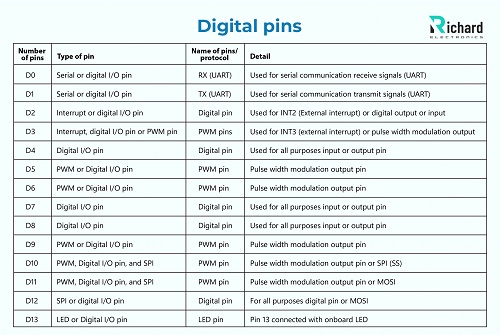
❖ 0- 13 digital pins: Pins 0 and 1 are used for serial communication RX and TX. The other pins are standard pins used for all-purpose input or output.
❖ Pulse width modulation: The PWM outputs are generated from digital pins 3, 5, 6, 9, 10, and 11.
A concise breakdown of Arduino Leonardo digital pins in tabular form is given there:
Number of pins | Type of pin | Name of pins/ protocol | Detail |
D0 | Serial or digital I/O pin | RX (UART) | Used for serial communication receive signals (UART) |
D1 | Serial or digital I/O pin | TX (UART) | Used for serial communication transmit signals (UART) |
D2 | Interrupt or digital I/O pin | Digital pin | Used for INT2 (External interrupt) or digital output or input |
D3 | Interrupt, digital I/O pin or PWM pin | PWM pins | Used for INT3 (external interrupt) or pulse width modulation output |
D4 | Digital I/O pin | Digital pin | Used for all purposes input or output pin |
D5 | PWM or Digital I/O pin | PWM pin | Pulse width modulation output pin |
D6 | PWM or Digital I/O pin | PWM pin | Pulse width modulation output pin |
D7 | Digital I/O pin | Digital pin | Used for all purposes input or output pin |
D8 | Digital I/O pin | Digital pin | Used for all purposes input or output pin |
D9 | PWM or Digital I/O pin | PWM pin | Pulse width modulation output pin |
D10 | PWM, Digital I/O pin, and SPI | PWM pin | Pulse width modulation output pin or SPI (SS) |
D11 | PWM, Digital I/O pin, and SPI | PWM pin | Pulse width modulation output pin or MOSI |
D12 | SPI or digital I/O pin | Digital pin | For all purposes digital pin or MOSI |
D13 | LED or Digital I/O pin | LED pin | Pin 13 connected with onboard LED |
Power pins:

Name of pins | Protocol/ type of pin | Detail |
GND | Ground pin | Ground pins are used to complete the circuits. |
5V | Power supply output pin | 5V power supply regulated through USB and also used for external power supply |
RESET | Reset pin | Used to reset the microcontroller board. |
VIN | Power supply input pin | Used for input voltage 7V- 12V. |
AREF | Analog reference pin | Used for reference voltages |
3.3V | Power supply output pin | The power supply of 3.3V regulated through this pin |
Specific pins:
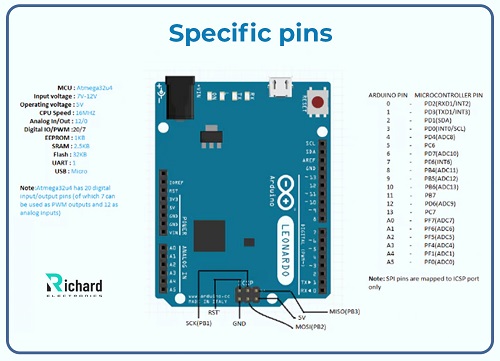
❖ Interrupt pin: used for the external interrupts.
❖ Pin 13: indwelling LEDs
❖ SPI: this pin is used for SPI communication and is present on ICSP headers which are MOSI, SCK, and MISO.
❖ I2C pins: data line or the clock line, pin 2 or pin 3 used for the I2C communication.

Name of pin/ header | Protocol/ type of pin | detail |
Native USB support | USB communication | It supports the native USB or is used in HID projects as a mouse, keyboards |
ICSP headers | SPI communication | For serial peripheral devices, the SPI interface is used. |
Analog input pins:
With 10-bit resolution, these pins are used to read or scan the analog inputs in between 0V - 5V.

Name of pin | Number of pins | Type of pin | detail |
Analog input pin | A0 | Analog input pin | Used as a digital I/O pin, or the analog input pin |
Analog input pin | A1 | Analog input pin | Used as a digital I/O pin, or the analog input pin |
Analog input pin | A2 | Analog input pin | Used as a digital I/O pin, or the analog input pin |
Analog input pin | A3 | Analog input pin | Used as a digital I/O pin, or the analog input pin |
Data line (SDA) | A4 | I2C communication or analog input pin | Used as a digital I/O pin analog input pin or for I2C communication |
Clock line (SCL) | A5 | I2C communication or analog input pin | Used as a digital I/O pin, analog input pin, or for I2C communication |
Datasheet of Arduino Leonardo:
Technical specifications are crucial to understand for exploring the ability and unique features of boards. The datasheet which includes the technical specifications of Arduino Leonardo can be downloaded by clicking the below button:
Download Arduino Leonardo Datasheet
Here are a few of its important features:

Parameters | Technical specifications |
microcontroller | |
Flash memory | 32 KB (4 used for bootloader) |
Operating voltage | 5V |
Weight | 20 grams |
SRAM | 2.5 KB |
length | 68.6 mm |
Digital I/O pins | 20 digital pins used for general purpose |
width | 53.3 KB |
Input voltage | 7V - 12V |
PWM pins | 7 pins used for PWM from 20 digital I/O pins |
EEPROM | 1 KB |
Analog input pins | 12 pins used for analog input pins |
LED pin | Pin 13 is used for built-in LEDs |
Clock speed | 16 MHz |
Limited input voltage | 6V - 20V |
DC on per Digital I/O pin | 40 mA |
Serial communication protocols | UART, SPI and I2C |
Power jack | 2.1 mm power plug |
Power used | Approximately 25 mA |
USB type | Type B USB used |
Reset button | present |
USB for HID | Used in HID projects as keyboard or mouse. |
Main features of Arduino Leonardo:
Arduino Leonardo offers numerous hallmarks, some of which are given there:
Microcontroller:
Arduino Lenordo is based on ATmega32u4, with flash memory used for storing code, and SRAM or EEPROM, used for non-volatile memory storage.

Flash memory | 32 KB for storing code (4 KB used for the bootloader) |
EEPROM | 1 KB |
SRAM | 2.5 KB |
Native USB support:
It allows native USB support, these features are not available on other microcontroller boards, others use a chip for handling the USB communication. This feature of Arduino Leonardo makes it perfect to design boards at a lower cost.
Clock speed:
Arduino Leonards operates through 16 MHz. it is sufficient to use them in different advanced projects.
USB communication:
It is one of the major features that differentiate the Arduino Leonardo from other microcontroller boards. It allows the built-in USB communication proficient and emulates the USB HID like a keyboard. These standout features make it ideal for using them in a wide range of projects.
Power supply:
Arduino Leonardo is powered through the USB or the external battery with a power supply of 7V - 12V.
Analog input pins:
Arduino Leonardo consists the 12 analog input pins, typically more related to the other microcontroller boards such as Arduino UNO consists of 6 analog input pins. These pins help to measure the signal that may be coming from the potentiometers or the temperature sensors.
Pulse width modulation output:
Arduino Leonard consists of 7 PWM output pins that are used for creating the sound effects and also for domming the LEDs.
Keyboard and mouse emulation:
Native USB support emulates the keyboard or mouse, this feature of Arduino Leonardo makes them idealize for use in gaming or automation systems.
Serial ports:
Microcontroller ATmega32u4 includes the ports for both USB and hardware. Serial pins are used for serial communication (RX and TX) and the USB port is used for communicating with the computer.
Integrated development environment (IDE) of Arduino Leonardo:
Arduino IDE is used to upload the code or program the Arduino Leonardo. Arduino IDE is open source and has friendly user interfaces through which the programming and debugging of code can be done onboard efficiently.

Major components of the Arduino IDE:
Major components of the Arduino IDE in detail are given there:
❖ Sketch or language: the term sketch in Arduino is commonly used for the Arduino program and it can be written in CC++ with syntax.
❖ Serial monitor in Arduino IDE: In Arduino IDE serial monitors are present and it used for sending or receiving data through the serial ports and help to communicate with the other boards. Through this hallmark, the code can be debugged on the board easily.
❖ Board selection: The Arduino Integrated development environment offers a wide range of boards to select, including Arduino Leonardo. Through this feature, it is simple to upload the code on board as compared to other microcontroller boards.
❖ Libraries: Arduino IDE supports a wide range of libraries, through this feature hardware elements can easily integrate like as motor controllers and others through some lines of code.
❖ Code uploading: through Arduino IDE, code automatically uploads on the board by clicking the button. The code is directly uploaded to the board through the USB connection.
❖ Cross-platform: Arduino IDE runs on Linux, Windows, and macOS, making it available on different platforms.
Steps for installing the Arduino IDE:
The steps to install the Arduino IDE are given there:
1. Download the updated version of Arduino IDE from the official Arduino website.
2. After downloading, install it according to the given instructions.
3. After completing the installation of Arduino IDE, connect the Arduino Leonardo to the computer through USB and then it is ready to start the program.
Simulation of Arduino Leonardo:
Many different professional tools are used for the simulation of Arduino Leonardo some of them are given there:
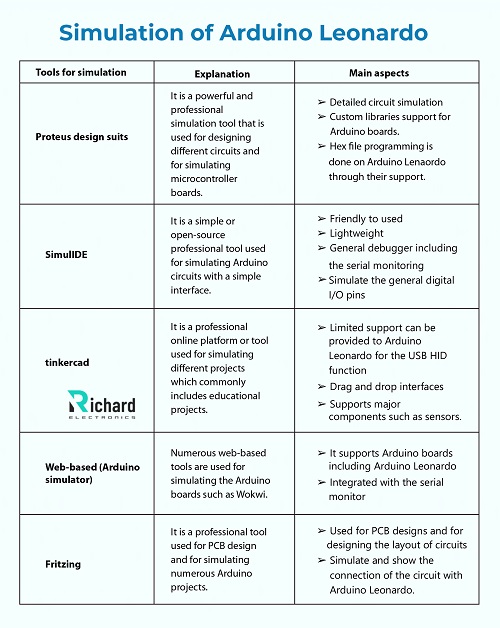
Tools for simulation | Explanation | Main aspects |
Proteus design suits | It is a powerful and professional simulation tool that is used for designing different circuits and for simulating microcontroller boards. | ➢ Detailed circuit simulation ➢ Custom libraries support for Arduino boards. ➢ Hex file programming is done on Arduino Lenaordo through their support. |
SimulIDE | It is a simple or open-source professional tool used for simulating Arduino circuits with a simple interface. | ➢ Friendly to used ➢ Lightweight ➢ General debugger including the serial monitoring ➢ Simulate the general digital I/O pins |
tinkercad | It is a professional online platform or tool used for simulating different projects which commonly includes educational projects. | ➢ Limited support can be provided to Arduino Leonardo for the USB HID function ➢ Drag and drop interfaces ➢ Supports major components such as sensors. |
Web-based (Arduino simulator) | Numerous web-based tools are used for simulating the Arduino boards such as Wokwi. | ➢ It supports Arduino boards including Arduino Leonardo ➢ Integrated with the serial monitor |
Fritzing | It is a professional tool used for PCB design and for simulating numerous Arduino projects.
| ➢ Used for PCB designs and for designing the layout of circuits ➢ Simulate and show the connection of the circuit with Arduino Leonardo. |
Example: (Arduino Leonardo simulating steps)
The steps that are followed for simulating the Arduino Leonardo are given there:
● Creating an account on the simulation tool
● Start or design the new circuit
● For simulating, Arduino Leonardo, add or select the Arduino Leonardo
● Drag and drop the basic components
● Draw or write the Arduino sketch
● Start or run the simulation process
Application of Arduino Leonardo:
Some major applications of Arduino Lenaordo are given there:
➢ Educational tools
➢ Robotics
➢ Wearable technology
➢ Input devices
➢ Emulate keyboards
➢ Interactive art
Limitations for Arduino Leonardo:
There are some limitations of Arduino Leonardo which are given there:
➢ Have only one hardware serial port
➢ Low storage memory
➢ Limited power supply
Advantages of Arduino Leonardo:
Major advantages of Arduino Leonarordo are given there:
➢ Low cost
➢ Community support
➢ Native USB support
➢ Versatility
➢ Remarkable features
Conclusion:
Arduino Leonardo is the most powerful and versatile microcontroller board with remarkable features. They are affordable and low-cost boards that are ideally used in numerous advanced projects. Its remarkable feature of native USB support makes it perfect to use in automation, input devices, and robotics.
Arduino Leonardo became the popular choice for engineers to develop or design new circuits. After reading this post we were able to explore Arduino Leonardo board details but it also helps to explore different electronic-based microcontroller boards.
- 1.
How many digital I/O pins does Arduino Leonardo have?
Arduino Leonardo has 20 digital I/O pins, with 7 of them supporting PWM output.
- 2.
What is the operating voltage of Arduino Leonardo?
The operating voltage of Arduino Leonardo is 5V, and the input voltage range is 7V - 12V.
 Sophie
Sophie, an accomplished electronic designer from Canada, holds a Bachelor's degree in Electrical Engineering from McGill University. She excels in developing advanced control systems that integrate mechanical, electrical, and computer engineering technologies. Her expertise particularly lies in working with electronic components. Notably, she has distinguished herself in conducting research involving Arduino and Raspberry Pi.

04 July 2026
06 June 2026
07 May 2026
17 April 2026

02 April 2026