It is sewn to fabrics, power supplies, sensors, and actuators with conductive thread. You attach it directly to your computer using a micro USB cable only. The Lily-pad Arduino USB is a microcontroller board based on Atmega32u4. It has 9 digital input/output pins, 4 of which are used as PWM outputs and 4 of which are analog inputs. It also has an 8 MHz resonator, a micro USB connection, a JST connector for a 3.7 LiPo battery, and a reset button.
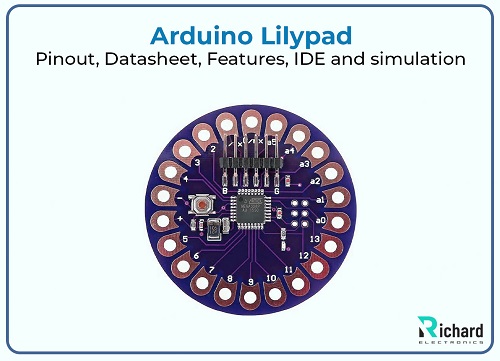
In this article, I am going to discuss basic information about Arduino Lilypad USB including the introduction, history, datasheet, specifications, main features, pinouts, IDE, and applications. I hope this article will be helpful and informative for you. Let’s start:
Arduino Lilypad Introduction:
● The Arduino lilypad, part of the Arduino ecosystem, is round-shaped and easy to integrate into various fabrics.
● The conductive pads located at the perimeter allow for easy connection using connecting thread, facilitating a flexible and sewable approach to electronics.
● The board is typically based on ATmega328(in the standard Lilypad) or ATmega32U4.
(in the USB version), both work at 16MHz.
● It has 32 KB flash memory from which 0.5 is reserved for bootloader.
● It has a 2 KB SRAM for data storage during program execution.
● It has 14 digital input/ output pins, with several able to provide PWM( Pulse Width Modulation) output.
● It has 6 analog input pins for reading various sensor data.
● The Lilypad is powered by small batteries like coin cell batteries and rechargeable lithium polymer batteries.
● It is designed for efficient power usage to extend battery life, crucial for wearable applications.
● The Lilypad is programmed using the widely accessible Arduino Integrated Development Environment ( IDE) which simplifies the process of writing and uploading code.
Arduino Lilypad History:
The Arduino LilyPad represents a significant evolution in the field of wearable technology and e-textiles. Arduino was founded in 2005 in Ivrea, Italy, by a group of students and professors. The goal was to create an open-source platform that would make electronics more accessible to artists and designers.
In the early 2000s, as wearable technology began to gain traction, researchers and designers started exploring ways to integrate electronics into textiles. This movement focused on creating garments and accessories that could respond to user interactions and environmental conditions.
The LilyPad was developed by Leah Buechley, a researcher at the MIT Media Lab, as part of her work on e-textiles. It was specifically designed to be sewn into fabric, making it suitable for wearable projects. Buechley aimed to create a platform that combined traditional textile craft with modern electronics, emphasizing aesthetics, ease of use, and functionality.
Like other Arduino products, the LilyPad was released as open-source hardware, allowing makers and developers to create their variations and applications. This openness fostered a community of creators who began experimenting with the platform.
Arduino Lilypad Datesheet:
The LilyPad Arduino is a series of microcontroller boards designed specifically for wearable electronics and e-textile projects. Below is a detailed explanation based on the typical LilyPad Arduino USB (or ATmega328 version) datasheet specifications.

Specific Parameters | Detail |
Microcontroller | ATmega328 |
Digital I/O pins | 14 |
PWM output pins | 6 from 14 digital I/O pins |
Operating voltage | 2.7 V - 5.5 V |
Flash memory | 32 KB ( 2KB used for bootloader) |
Input voltage | 2.7 V - 5.5 V |
Diameter | 50 mm or 2 inches |
Thickness | 0.8mm |
Analog input pins | 6 |
SRAM | 2 KB |
Power supply | External power source, lipo battery |
EEPROM | 1 KB |
Arduino Lilypad Pinout:
Here’s a detailed description of the Arduino LilyPad pinout for both the LilyPad Arduino USB (with ATmega32U4) and LilyPad Arduino Simple (with ATmega328P). Understanding the pinout is essential for correctly wiring sensors, actuators, and peripherals in your e-textile and wearable projects.
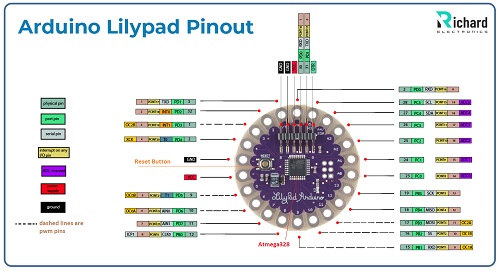
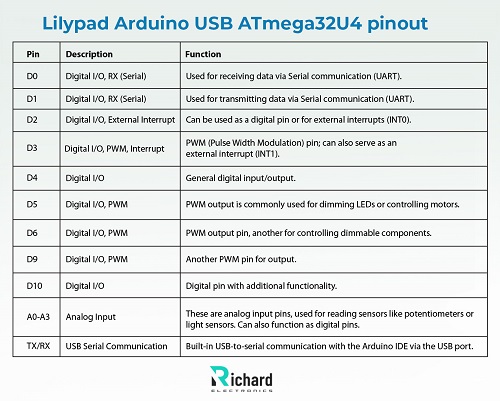
Lilypad Arduino USB ATmega32U4 pinout:
This version features the ATmega32U4 microcontroller with 9 digital I/O pins and 4 analog input pins.
Pin configuration:
Pin | Description | Function |
D0 | Digital I/O, RX (Serial) | Used for receiving data via Serial communication (UART). |
D1 | Digital I/O, RX (Serial) | Used for transmitting data via Serial communication (UART). |
D2 | Digital I/O, External Interrupt | Can be used as a digital pin or for external interrupts (INT0). |
D3 | Digital I/O, PWM, Interrupt | PWM (Pulse Width Modulation) pin; can also serve as an external interrupt (INT1). |
D4 | Digital I/O | General digital input/output. |
D5 | Digital I/O, PWM | PWM output is commonly used for dimming LEDs or controlling motors. |
D6 | Digital I/O, PWM | PWM output pin, another for controlling dimmable components. |
D9 | Digital I/O, PWM | Another PWM pin for output. |
D10 | Digital I/O | Digital pin with additional functionality. |
A0-A3 | Analog Input | These are analog input pins, used for reading sensors like potentiometers or light sensors. Can also function as digital pins. |
TX/RX | USB Serial Communication | Built-in USB-to-serial communication with the Arduino IDE via the USB port. |
Power Pins:
● VCC: 3.3V output pin that can be used to power external components like sensors or small actuators.
● GND: Ground connection for your circuit.
● VBAT: Connects to a 3.7V lithium polymer (LiPo) battery.
Lilypad Arduino Simple (ATmega328P) Pinout:
This version features fewer pins and a simpler design but is equally suited for wearables.
Pin configuration:

Pins | Description | Function |
D0 | Digital I/O | Digital input/output. |
D1 | Digital I/O | Digital input/output. |
D2 | Digital I/O, External Interrupt | Can be used for digital input/output or external interrupt (INT0). |
D3 | Digital I/O, PWM | PWM output pin (useful for controlling LEDs or motors), can also be used as an interrupt pin. |
D4 | Digital I/O | General digital pin for I/O. |
D5 | Digital I/O, PWM | PWM output pin. |
D6 | Digital I/O, PWM | Another PWM output pin. |
A0 | Analog Input, Digital I/O | It can be used as an analog input or a general digital input/output pin. |
A1 | Analog Input, Digital I/O | Similar to A0, can be used as an analog or digital input/output pin. |
A2 | Analog Input, Digital I/O | Another analog input pin that can be used for digital I/O. |
A3 | Analog Input, Digital I/O | Another pin for analog sensing or digital I/O. |
Power pins:
● VCC: Provides 3.3V output for powering peripherals.
● GND: Ground connection for completing circuits.
● BAT+: Battery input for a 3.7V lithium polymer battery.
Power Management:
● VCC: Provides a 3.3V output for powering components.
● GND: Common ground for all components.
● Battery input: Designed for use with 3.7V lithium polymer (LiPo) batteries, which are ideal for wearables due to their lightweight and rechargeable nature.
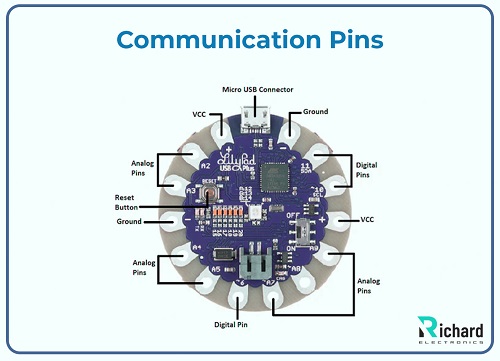
Communication Pins:
● TX (D1) and RX (D0): Used for Serial communication, especially when communicating with other devices or peripherals.
● I2C (A4 and A5): For I2C communication, these analog pins are used for connecting to I2C-compatible sensors and devices.
Arduino Lilypad Features:
The Arduino LilyPad is a unique and versatile platform specifically designed for wearable electronics and e-textile projects. Here’s a detailed overview of its key features:
Wearable and Sewable Design:
● Flat and Circular Shape: The LilyPad boards are round and flat, with large sewable connection points (pads) along the perimeter. These pads are designed to be easily connected to conductive thread, allowing for integration into textiles and clothing.
● Flexible PCB: The board is made from a thin, flexible PCB, making it more comfortable to wear or embed in fabric, as it can contour to the shape of garments or accessories.
● Washable: Once components like batteries are removed, LilyPad projects can often be washed carefully, a critical feature for wearable electronics.
Power Options:
● LiPo Battery Support: The LilyPad is designed to work with 3.7V Lithium Polymer (LiPo) batteries, making it ideal for portable and wearable applications. The LilyPad includes a JST connector for easy battery attachment.
● USB Power (LilyPad USB version): The LilyPad Arduino USB can be powered directly through a USB connection when programming or running from a computer.
● Voltage Regulator: An onboard voltage regulator steps down the battery or USB voltage to 3.3V, which is required for the microcontroller and peripherals.
Lower Power Consumption:
● Designed for Low-Power Operation: The LilyPad operates at 3.3V with an 8 MHz clock speed, which helps to reduce power consumption. This is critical for wearables that need to run for long periods on small batteries.
● Sleep Modes: The microcontroller (ATmega32U4 or ATmega328) includes multiple low-power sleep modes that further reduce energy use when the device is inactive.
Microcontroller Options:
LilyPad Arduino USB (ATmega32U4):
● 32 KB Flash Memory (with 4 KB used by the bootloader).
● 2.5 KB SRAM and 1 KB EEPROM.
● Integrated USB for programming and communication.
LilyPad Arduino Main Board or Simple Board (ATmega328P):
● 32 KB Flash Memory (with 2 KB used by the bootloader).
● 2 KB SRAM and 1 KB EEPROM.
● Requires an external FTDI programmer for uploading sketches.
Input/ Output Pins:
Digital I/O Pins:
● The board has 9 digital I/O pins (LilyPad USB version), allowing for the connection of components like buttons, sensors, and LEDs.
● Up to 4 of these pins can be configured for PWM output, useful for controlling LED brightness or motor speed.
Analog Input Pins:
● It has 4 analog input pins (A0-A3), which can be used to read sensors that output analog signals (e.g., light sensors, temperature sensors).
● These pins can also be used as additional digital pins.
Built-In USB Programming:
● USB Connectivity (LilyPad Arduino USB): The LilyPad Arduino USB version has an onboard micro-USB port, allowing it to be programmed directly through a USB cable without needing an external programmer.
● External Programming (LilyPad Simple/Original): Older versions, like the LilyPad Main Board or Simple Board, require an FTDI cable or USB-to-serial adapter to upload code.
Multiple Communication Protocols:
Serial Communication:
Allows communication with external devices using UART (TX/RX).
I2C (Inter-Integrated Circuit):
Supports I2C communication, which allows multiple devices like sensors and displays to be connected to the same data and clock lines.
SPI (Serial Peripheral Interface):
This protocol allows high-speed communication with peripherals like SD cards or displays.
Programming with Arduino IDE:
The LilyPad is programmed using the Arduino IDE, making it accessible to beginners and advanced users alike. It supports all Arduino libraries, enabling rapid prototyping of wearable projects.
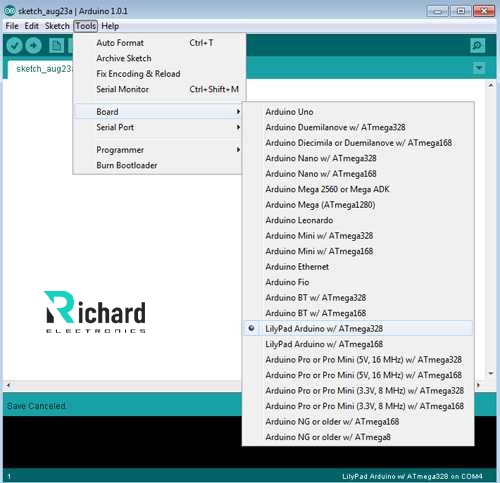
Easy Code Upload:
For the USB version, the code can be uploaded directly via a micro-USB cable. For older versions, an external FTDI board or USB-to-serial converter is needed.
Simulation Tools
Tinkercad
It is best online and is used to stimulate simple Arduino projects. We can use Tinkercad with basic Arduino circuits because it is not connected directly. It allows users to test the coding and basic functions of the circuit.
Proteus
Proteus is used for Arduino code and basic circuit simulation while mainly it is used for complex boards. It is used for testing some aspects of Lilypad projects, but directly it cannot support Lilypad layouts. It can simulate only limited codes and connections.

Expansion and Community Impact:
Expansion and features:
Over the years, various versions of the LilyPad have been introduced, including the LilyPad USB, which integrates a USB interface for easier programming. The board has also been updated with new components and libraries to enhance its capabilities.
Educational tool:
The LilyPad has become a popular tool in educational settings, particularly in design and technology courses. It encourages students to explore the intersection of art, design, and technology through hands-on projects.
Rise of Wearable technology:
As interest in wearable technology grew, the LilyPad gained prominence among hobbyists and professionals alike. It became a go-to platform for creating smart clothing, health monitoring devices, and interactive art installations.
Community and Collaboration:
The LilyPad has fostered a vibrant community of artists, designers, and engineers who share projects, tutorials, and ideas online. This collaborative environment has led to a wealth of innovative applications and designs.
Continued Innovation:
The Arduino LilyPad continues to be updated and supported by the Arduino community, with ongoing projects exploring new materials, sensors, and applications. Its influence can be seen in the growing smart textiles and wearable electronics fields.
Arduino Lilypad USB:
Features an ATmega32U4 microcontroller, operating at 3.3V with 9 digital I/O pins (4 PWM outputs and 4 analog inputs). It includes a micro USB connection and a JST connector for a 3.7V LiPo battery.
Arduino Lilypad Simple Board:
Controlled by an ATmega328 with the Arduino bootloader, it offers fewer pins than the main board, a built-in power supply socket, and an on/off switch.
Use Case Example:
● Wearable Sensors: Connect sensors like temperature, light, or motion sensors to the analog pins (A0-A3) to detect environmental changes and trigger actions.
● LEDs: The PWM pins (D3, D5, D6, D9) are perfect for controlling the brightness of sewn-in LEDs or driving small motors in wearable applications.
● Soft Circuits: The large sewable pads allow easy integration with conductive threads, eliminating the need for soldering in wearable projects.
Conclusion:
Arduino Lilypad is designed for wearable technology. It can be easily sewn into clothes and washable. It can be sewn to fabrics, power supplies, sensors, and actuators with conductive thread. You can attach this directly to your computer by using a micro USB cable only. It is ideal for power-efficient projects to extend battery life. The Lilypad is programmed using the widely accessible Arduino Integrated Development Environment ( IDE) which simplifies the process of writing and uploading code.
 Sophie
Sophie, an accomplished electronic designer from Canada, holds a Bachelor's degree in Electrical Engineering from McGill University. She excels in developing advanced control systems that integrate mechanical, electrical, and computer engineering technologies. Her expertise particularly lies in working with electronic components. Notably, she has distinguished herself in conducting research involving Arduino and Raspberry Pi.


04 September 2026
05 August 2026
04 July 2026

06 June 2026
07 May 2026