Despite its compact body and small size, the Arduino Pro Mini has a rich feature set that makes it a versatile and powerful option when working with embedded and electronic projects. With 14 digital input/output pins, including 6 PWM-capable outputs and 6 analog inputs, this smart board fits the requirements of a large variety of projects. Moreover, it supports I2C, SPI, and UART communication protocols, ensuring seamless integration and communication with other devices. Unlike Arduino Nano(A000005), it lacks a built-in USB, which helps in reducing the size. So, we need to use an external USB to Serial Adopter in order to program the board.

In this article, I am going to discuss the basic information about the Arduino Pro Mini, including the introduction, history, datasheet, specifications, main features, pinouts, IDE, and applications. Moreover, by the end of this article, you’ll be able to create a simple simulation using the Arduino IDE and Arduino Prio Mini microcontroller. Let’s get started.
Arduino Pro Mini Introduction
● Arduino Pro Mini is a compact, small, but powerful microcontroller board developed and represented by Arduino.cc.
● This board was introduced for space constraints and cost-effective projects and uses the ATmega328P microcontroller as its core.
● Out of 16 digital IO pins, 6 are the PWM output, which makes it a good choice for speed-controlled projects.
● The 8 analog pins of this board are utilized for the connection of devices like sensors where the output continuous values are required.
● The Arduino Pro Mini is six times smaller than the Arduino UNO but has the same processing power.

● It has two basic types, the details of which will be shown in the next section.
● The Arduino Pro Mini is termed the application-type microcontroller because the USB-to-serial port is removed from the board to save space.
● The programming of the Arduino Mini is the same as the other board, that is, the Arduino IDE is used for the uncomplicated and open-source coding process.
● The pin 13 has a small LED on the board and it also has the RESET button for the ease of the users.
Arduino Pro Mini History
Arduino Pro Mini was introduced in 2005 as part of the Arduino platform to cater to the needs of developers and engineers requiring a compact and powerful microcontroller at a low price by Sparkfun Electronics. The founder of this organization was Nathan Seidle, who had an eye on the trends and needs of the microcontroller board users. The main reason for this introduction was to fulfill the needs of the project where power consumption, size, and simplicity were the key considerations. So, the designers added the ATmega328P microcontroller as its heart and omitted the onboard USB to serial adaptor from the board to provide a small and cost-efficient board. At the start, it was considered the smaller version of the standard Arduino UNO.

In the late 2000s, the Arduino family gained popularity among hobbyists, engineers, and programmers, and as the community grew, different users demanded the smaller and more popular boards. By the end of this decade, the Arduino Pro Mini was equally famous among students, learners, teachers, and professionals, and the main applications were found in DIY projects, the Internet of Things (IoT), and wearable devices.
In 2010, the two options for the Arduino Pro Mini were introduced, that is:
1. 5V version running at 16 MHz
2. 3.3V version at 8 MHz
These variants cater to different voltage and power requirements and fit into projects with different windows to target almost all types of users.
Arduino Pro Mini History Table
The Arduino Pro Mini is a relatively latest version of the Arduino family but it has gone through different upgrades over the years. Collecting the information about each event is irrelevant to this article, so I have created a table showing the steps through which the Arduino Pro Mini has gone:

Year | Event/Development |
2008 | Initial Release by SparkFun Electronics |
2008 | Microcontroller: ATmega168 |
2010 | Upgrade to ATmega328P |
2010 | Two Voltage variations |
2010-2012 | Widespread Adoption in DIY and Embedded Projects |
2015 | Further Optimizations by the Community |
2017-2020 | Sustained Popularity in Education and Prototyping |
Present | Continued Use and Compatibility with Newer Technologies |
Arduino Pro Mini Datasheet
The powerhouse of the Arduino Pro Mini is the ATmega328P microcontroller, which is an 8-bit AVR processor that runs on very low power and has the RSIC architecture. Understanding the features and specifications of the ATmega328P microcontrollers is essential to understanding the specification of the Arduino Pro Mini so if you want to go into its details, visit the following link:
Arduino Pro Mini Specifications
The Arduino Pro Mini stands out as a minimalist yet powerful microcontroller and while introducing it for the first time in the market, the manufacturers have discussed in detail that despite its compact size, it comes with all the core functionalities that the user may expect from the Arduino board. Let’s check all its features in detail and start from the built-in memory.
Arduino Pro Mini Memory
There are different types of memory in electronic devices and to advance the versatility of this board, the designers have used three types of memory in the Arduino Pro Mini:
1. Flash memory
2. SRAM
3. EEPROM
The details of each of them, along with the basic definition, are below given:
● The flash memory is the non-volatile memory, which means it retains the data even in power-off mode. The Arduino Pro Mini uses it to store the programming codes called sketches and utilize them while working. It has 32KB of flash memory, out of which 0.5KB is used for the bootloader code.
● Static random-access memory (SRAM) is the type of volatile memory that loses all the data when the power is removed. It is the temporary storage in the microcontroller that stores the temporary variables and other such data while the code is running. In Arduino Pro Mini, the SRAM is limited to 2 KB, and it is crucial to utilize this memory for effectively running the program.
● The EEPROM (Electrically Erasable Programmable Read-Only Memory) is the non-volatile memory and allows the data to be removed or written through the electrical signals. As a result, it allows the data to be written, modified, or removed during the microcontroller functions. The total size of the Arduino Pro Mini’s EEPROM is 1KB.
Here is the table of the memory specifications of this microcontroller:

Memory Type | Capacity |
Flash Memory | 32 KB (with 2 KB used by bootloader) |
SRAM | 2 KB |
EEPROM | 1 KB |
Arduino Pro Mini Power Consumption
Both versions of Arduino Pro Mini run on very low power. It makes it an ideal choice for battery-oriented projects, especially where power consumption is the critical factor. It is designed to enter sleep mode to conserve energy when it is not running the resource-intensive task for a long time.
Arduino Pro Mini Programming Modes
Unlike other members of the Arduino family, the Arduino Pro Mini lacks an onboard USB-to-serial converter; therefore, an external FTDI or CP2102 adapter. This approach makes it different from other boards and reduces the need for more space and power but is considered an extra step when programming using this board.
The other mode for the Arduino Pro Mini is ICSP (In-Circuit Serial Programming) and the hardware programmer is required to adopt this method. It consists of the size pins:
● MISO
● MOSI
● SCK
● RST
● VCC
● GND
This is utilized when the user does not want to opt for the aforementioned process.
Arduino Pro Mini Physical Dimensions
The most highlighted feature of the Arduino Pro Mini is its small size. Unlike other Arduino boards, it comes in the size of 18 mm x 33 mm; it is a perfect choice for wearables and other such devices with space constraints as the main feature.
Arduino Pro Mini Additional Features
In the Arduino family, the basic features of the boards are almost the same but they differ in some additional features, Below is the list and description of some important features:
● The Arduino Pro Mini has the physical reset button that is absent in many other Arduino board. This helps the users to rest the whole code manually in just one button.
● This board comes with the availability of the raw mode and is an alternative approach to the external USB-to-serial converter for direct communication with the microcontroller.

● It has an onboard power LED that indicates the power supply when the board is connected to any source.
● The digital pin13 of Arduino Pro Mini is considered the status LED and verifies the proper running or debugging of the board.
As mentioned earlier, the Arduino Pro Mini comes in two variants, one that operates on the 5V and the other that operates on the 3.3V. The details of both of these versions with respect to their similarities and differences, are discussed in the table below:
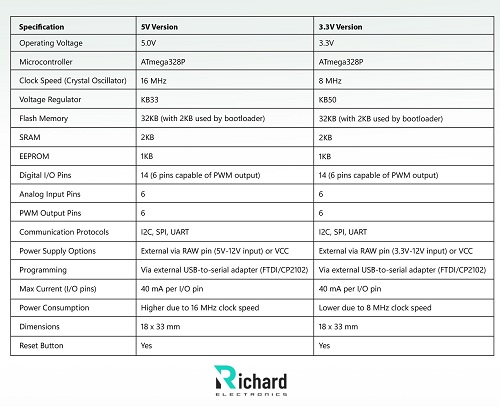
Specification | 5V Version | 3.3V Version |
Operating Voltage | 5.0V | 3.3V |
Microcontroller | ATmega328P | ATmega328P |
Clock Speed (Crystal Oscillator) | 16 MHz | 8 MHz |
Voltage Regulator | KB33 | KB50 |
Flash Memory | 32KB (with 2KB used by bootloader) | 32KB (with 2KB used by bootloader) |
SRAM | 2KB | 2KB |
EEPROM | 1KB | 1KB |
Digital I/O Pins | 14 (6 pins capable of PWM output) | 14 (6 pins capable of PWM output) |
Analog Input Pins | 6 | 6 |
PWM Output Pins | 6 | 6 |
Communication Protocols | I2C, SPI, UART | I2C, SPI, UART |
Power Supply Options | External via RAW pin (5V-12V input) or VCC | External via RAW pin (3.3V-12V input) or VCC |
Programming | Via external USB-to-serial adapter (FTDI/CP2102) | Via external USB-to-serial adapter (FTDI/CP2102) |
Max Current (I/O pins) | 40 mA per I/O pin | 40 mA per I/O pin |
Power Consumption | Higher due to 16 MHz clock speed | Lower due to 8 MHz clock speed |
Dimensions | 18 x 33 mm | 18 x 33 mm |
Reset Button | Yes | Yes |
Arduino Pro Mini Key Aspects
Here is the detail of the broader characteristics and qualities of the Arduino Pro Mini to focus on its usability and advantages:
Arduino Pro Mini Low Power Consumption
The compact design of the board not only reduces its size but also the need for power. It has three power-consuming modes:
1. Active mode: When the board is running
2. Idle mode: Using delay() or similar
3. Sleep mode: Using power-saving techniques
Both variants of Arduino Pro Mini consume different amounts of power and the table shows the details
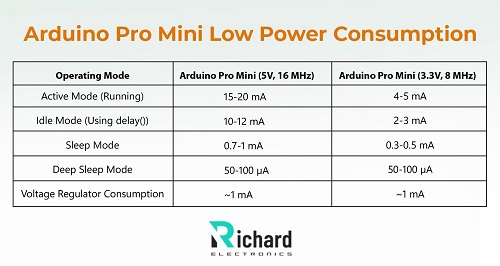
Operating Mode | Arduino Pro Mini (5V, 16 MHz) | Arduino Pro Mini (3.3V, 8 MHz) |
Active Mode (Running) | 15-20 mA | 4-5 mA |
Idle Mode (Using delay()) | 10-12 mA | 2-3 mA |
Sleep Mode | 0.7-1 mA | 0.3-0.5 mA |
Deep Sleep Mode | 50-100 µA | 50-100 µA |
Voltage Regulator Consumption | ~1 mA | ~1 mA |
Arduino Pro Mini Pre-Soldered Headers
Unlike other Arduino boards, the Arduino Pro Mini does not come with pre-solder headers and provides the freedom of the user to connect and customize the board according to the project's needs. The three most common options for the board connection are:
● Straight header
● Angled header
● Connecting wires
Arduino Pro Mini Communication Protocols
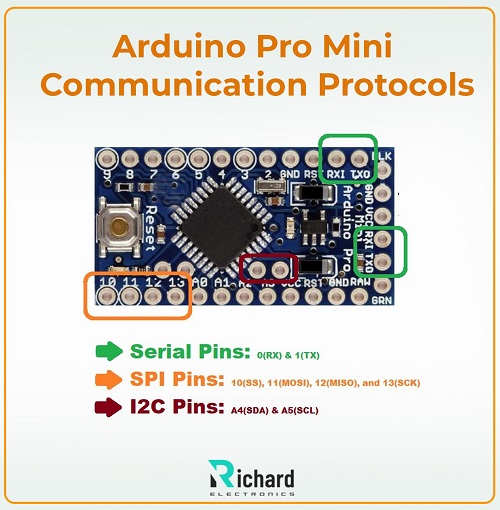
The Arduino Pro Mini has three communication protocols:
● UART (Universal Asynchronous Receiver/Transmitter): It is used for communication with other devices such as computer modules, or any other.
● SPI (Serial Peripheral Interface): It is useful for high-speed communication with peripheral devices such as sensors.
● I2C (Inter-Integrated Circuit): it is preferred when multiple device communication is required on a single bus.
The table elaborates these protocols, pin numbers, and speed with respect to the Arduino Pro Mini:
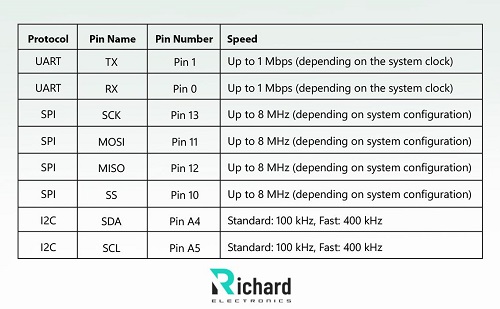
Protocol | Pin Name | Pin Number | Speed |
UART | TX | Pin 1 | Up to 1 Mbps (depending on the system clock) |
UART | RX | Pin 0 | Up to 1 Mbps (depending on the system clock) |
SPI | SCK | Pin 13 | Up to 8 MHz (depending on system configuration) |
SPI | MOSI | Pin 11 | Up to 8 MHz (depending on system configuration) |
SPI | MISO | Pin 12 | Up to 8 MHz (depending on system configuration) |
SPI | SS | Pin 10 | Up to 8 MHz (depending on system configuration) |
I2C | SDA | Pin A4 | Standard: 100 kHz, Fast: 400 kHz |
I2C | SCL | Pin A5 | Standard: 100 kHz, Fast: 400 kHz |
Arduino Pro Mini Pinouts

Before using any electronic devices, especially microcontrollers, it is crucial to understand the pinout and their features. It has a total of 28 pins that are divided into different categories and I am going to discuss all of these:
Arduino Pro Mini Digital I/O Pins (0-13)
The pin 0 to 13 are used for the digital input-output communication. These are further categorized as:
● Pins 0 and 1: These pins are used for serial communication through UART. Where Pin 0 is RX1 and Pin 1 is TX0.
● Pins 2-13: these are the general purpose input/output (GPIO) and are used to control devices such as sensors, motors, and others.
● Pins 5, 6, 9, 10, 11, and 12: These pins are dedicated for the SPI communication.
● Pins 4 and 5: The purpose of these pins is to work for the I2C communication.
● Pins 3, 5, 6, 9, 10, 11: These pins are the PWM pins and are used for controlling the speed of motors and other such purposes.
Arduino Pro Mini Analog Pins (A0-A5)
This board has the 6 analog input pins, labeled A0 to A5, and can read the analog (continuous) signals. These come with a resolution of 10 bits and the main purposes of these pins are:
● Reading sensor data
● Controlling analog devices
● Generating analog signals
Arduino Pro Mini Power Pins
There are five power pins in this board that are:
● RAW (unregulated input voltage): It is the unregulated voltage input and the user can provide up to 12V on it. The board automatically regulates the voltage and uses it in its functioning.
● VCC (regulated 3.3V or 5V, depending on the version): it is the regulated voltage output pin that provides the particular voltage supply to the components.
● GND (Ground) - 2 pins: These pins provide the ground terminal to the board and complete the circuit. These have the 0V reference for the microcontroller.
● RESET pin: This pin resets the whole board, that is, removes the code burnt on the board.
Arduino IDE for Arduino Pro Mini
The Arduino IDE is the official Integrated Development Environment to program the Arduino boards. It is an open-source IDE where these boards can be programmed in C++. It is user-friendly software released in 2005 and allows the user to compile, write, and upload the code. It acts as the cornerstone for novice and experienced developers. The below section is dedicated to its main feature:
User-Friendly Interface
This IDE is designed to be intuitive and accessible for beginners but still provides advanced features.
Cross-platform Compatibility
It is available for all basic operating systems, such as Windows, macOS, and Linux, so it targets a great number of users.
Built-in Libraries
It has a vast collection of built-in libraries related to different devices, such as motors, sensors, and other hardware components.
Built-in Examples
The Arduino IDE has a collection of built-in examples of different categories, such as sensors, BLE, sensors, etc.
Similarly, other features such as code editors, integrated environments, and serial monitors make it a powerful IDE.
Arduino IDE Simulation with Arduino Pro Mini
Let’s create a simple blinking light with the Arduino Pro Mini using the Arduino IDE for the programming. Here are the essentials you must need:
Components Required
● Arduino Pro Mini (Any version)
● USB-to-TTL Converter
● Jumper Wires
● Arduino IDE
Procedure
● Collect all the required components.
● Connect the components with the Arduino Pro Mini using the table given below:

USB-to-TTL Converter Pin | Arduino Pro Mini Pin |
TX | RX |
RX | TX |
GND | GND |
VCC | VCC |
DTR (or RTS) | RESET |
SPI | SS |
I2C | SDA |
I2C | SCL |
● Download and install the Arduino IDE.
● Install the required board in the Arduino IDE.
● Create a new project.
● Connect the USB-to-TTL converter to your computer. This will turn the power LED on.
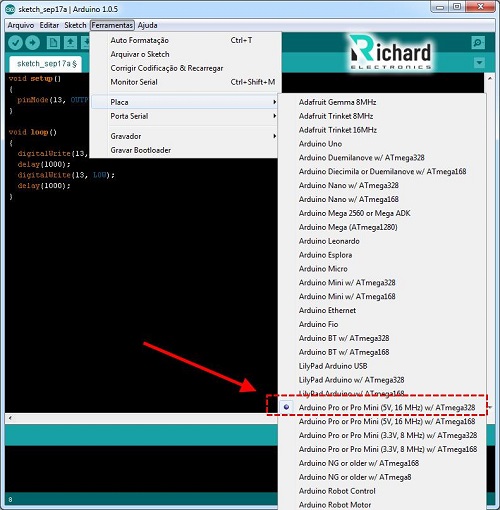
● Go to Boards> Arduino Pro Mini.
● Go to Port>select the appropriate port according to your system.
● Delete the built-in code on your new sketch.
● Paste the following code:
void setup() {
pinMode(13, OUTPUT); // Set pin 13 as output
}
void loop() {
digitalWrite(13, HIGH); // Turn the LED on
delay(1000); // Wait for a second
digitalWrite(13, LOW); // Turn the LED off
delay(1000); // Wait for a second
}
● Press the upload button to compile and upload the code.
If all the steps are completed successfully, you will see the LED light blinking.
Arduino Pro Mini Applications
Here is the list of most common applications of Arduino Pro Mini:
● Wearable Technology: Health matrix monitoring such as heart rate, temperature, and physical activity.
● Robotics
● IoT (Internet of Things) Projects: Smart home devices, environmental monitoring systems, remote control applications, etc.
● Home Automation
● Data logging
● Embedded systems
● Wireless communication
● Educational projects
The Arduino family provides useful services in embedded electronics, robotics, medical devices, wearables, and other such fields. The Arduino Pro Mini is a useful microcontroller with a compact size and an abundance of features that make it an ideal choice for low-power-consuming projects requiring small components. We have discussed its introduction, specifications, pinouts, datasheets, applications, and many other points. In the project, we have used the TTL converter pin but the code is the same if you are using any other converter or direct wires for the connection of the microcontroller. Arduino IDE has some built-in examples for the LED blink and other such projects that help the user understand the basic coding process; you can use them to polish the skills. I hope you have got all the information about the Arduino Pro Mini that you were searching for and if you want to learn more, you can ask in the comment section.
 Sophie
Sophie, an accomplished electronic designer from Canada, holds a Bachelor's degree in Electrical Engineering from McGill University. She excels in developing advanced control systems that integrate mechanical, electrical, and computer engineering technologies. Her expertise particularly lies in working with electronic components. Notably, she has distinguished herself in conducting research involving Arduino and Raspberry Pi.


04 September 2026
05 August 2026
04 July 2026

06 June 2026
07 May 2026