If you would like to compare the differences between the Arduino UNO and Arduino Nano, please click on "compare".Arduino Nano is a powerful and firm microcontroller board based on the ATmega328P microcontroller in the Arduino ecosystem. It offers a wide range of hallmarks convertible to the Arduino Uno. It is a small, breadboard-friendly board, and its small size makes it ideally perfect for breadboard prototyping, Space-constrained projects, and wearable electronics.
Arduino Nano(A000005)has some similar functionality to Arduino Duemilanove. It has only the scarcity of a power jack or it can be worked through a mini USB rather than a standard cable. Let’s start our detailed discussion and inspect Arduino Nano, including its pinout, features, simulation, datasheet, and programming environment (IDE), and also understand their embedded applications.

Download the Arduino Nano Datasheet
History of Arduino Nano:
The roots of the Arduino project can be tracked from 2003, started in IDII (Interaction Designs Institute Lvera) in Italy. After the success of the Arduino projects by launching the Arduino uno or the Arduino Duemilanove boards, the founder of the Arduino project inspired and started the development to launch the small size, portable Arduino board with a compact design for their users. Through their development, in 2008 they launched the Arduino Nano board which is the smaller size version of the Arduino Duemilanove boards and is also based on the ATmega168P microcontroller.
Gianluca Martino or Gravitech presented the Arduno nano design, a hardware manufacturer centered in Thailand. They can be built as compact, firm, and cost-effective boards rather than Arduino boards.
❖ Goals of Arduino Nano:
● Low cost
● Minimum configuration of pins
● mini-USB connection
● Compact ( fit on breadboards for prototyping)
● Open source
Evolution of Arduino Nano:
Firstly the Arduino Nano can be based on the ATmega168P microcontroller, but the front-runner Arduino has more processing power and memory compared to this, then they need more memory and power the Arduino Team, in 2010 started their development and launched the Arduino Nano based on the ATmega238P similar to most popular Arduino Uno.

Parameters | Evolution ranges |
Flash memory | 16 KB and 32 KB |
SRAM and EEPROM | 2 KB 1 KB their capacities can be doubled so more complex programs can be done. |
microcontroller | ATmega168P to ATmega238P microcontroller |
Arduino Nano R3 and different new Nano boards:
The Arduino Nano has different new brands with features and improvements expanding the Arduino ecosystem, their detail is given below:
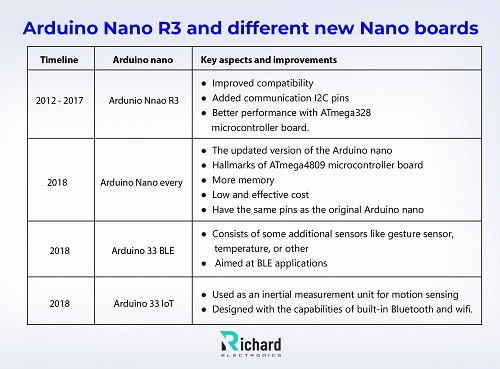
Timeline | Arduino nano | Key aspects and improvements |
2012 - 2017 | Ardunio Nnao R3 | ● Improved compatibility ● Added communication I2C pins ● Better performance with ATmega328 microcontroller board. |
2018 | Arduino Nano every | ● The updated version of the Arduino nano ● Hallmarks of ATmega4809 microcontroller board ● More memory ● Low and effective cost ● Have the same pins as the original Arduino nano |
2018 | Arduino 33 BLE | ● Consists of some additional sensors like gesture sensor, temperature, or other ● Aimed at BLE applications |
2018 | Arduino 33 IoT | ● Used as an inertial measurement unit for motion sensing ● Designed with the capabilities of built-in Bluetooth and wifi. |
Arduino nano pinout:

Arduino Nano has 30 pins which include power, digital, RESET, communication interfaces, and analog pins. The breakdown of 30 pins with their function is given there:
D0- D13 (Digitals pins):
● D0 and D1: these pins can be used for serial communication and are represented as RX and TX.
● D2- D13: these pins are digital and used for general purposes.
● Pulse width modulation pins: Pulse width modulation (PWM) can generated through D3, D5, D6, D9, D10, and D11. For dimming LEDs and for controlling motors these pins are useful.
Power pins:
● 3.3V: it can be useful for low-voltage sensors because it can regulate the output 3.3V.
● Vin: an input power source when a 7- 12V power supply can be used externally.
● GND: ground pins are necessary for completing the circuit, these two ground pins are available for connection.
● 5V: 5V is provided and regulated for powering the connected sensors.
A0- A7 (Analog pins):
● A0 - A7: analog signals can be read through these pins and then converted into 10-bit digital values.
● A6 - A7: these pins only read the input analog signals dissimilar from the Arduino Uno.
Communication interfaces:
● SPI: D10 - SS, D11- MOSI, D12- MISO, D13- SCK) it can communicate with peripherals like RFID readers or SD card modules.
● UART: D0 and D1 for serial communication to connect them with a PC or another microcontroller.
● I2C: A4 - SDA and A5- SCL, are connected with display, sensors, and modules because they use the I2C protocol.
Other pins:
● AREF: for analog input, it provides the external reference voltage.
● Reset: RST, reset the microcontroller.
Tabular adumbration of Arduino nano pins:
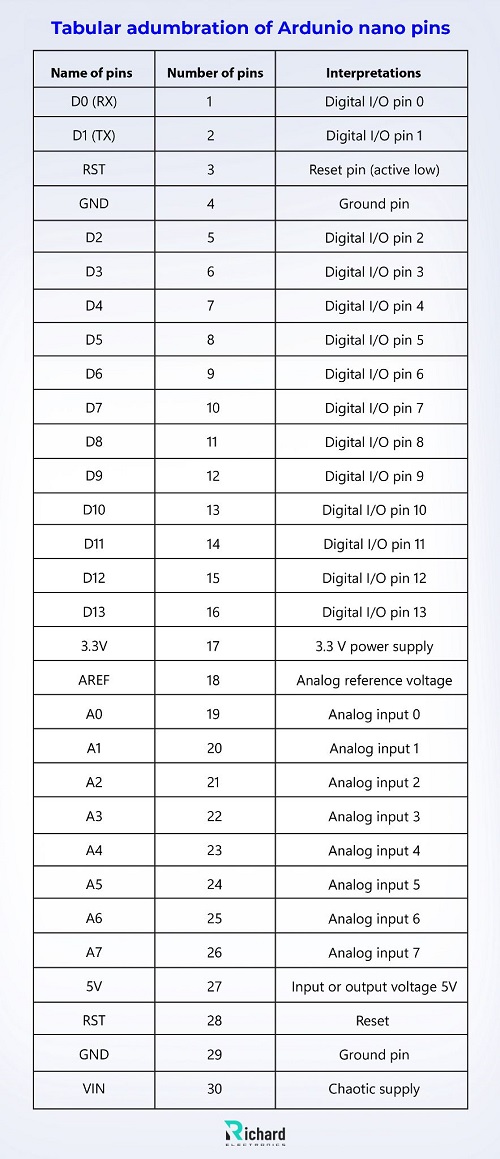
Name of pins | Number of pins | Interpretations |
D0 (RX) | 1 | Digital I/O pin 0 |
D1 (TX) | 2 | Digital I/O pin 1 |
RST | 3 | Reset pin (active low) |
GND | 4 | Ground pin |
D2 | 5 | Digital I/O pin 2 |
D3 | 6 | Digital I/O pin 3 |
D4 | 7 | Digital I/O pin 4 |
D5 | 8 | Digital I/O pin 5 |
D6 | 9 | Digital I/O pin 6 |
D7 | 10 | Digital I/O pin 7 |
D8 | 11 | Digital I/O pin 8 |
D9 | 12 | Digital I/O pin 9 |
D10 | 13 | Digital I/O pin 10 |
D11 | 14 | Digital I/O pin 11 |
D12 | 15 | Digital I/O pin 12 |
D13 | 16 | Digital I/O pin 13 |
3.3V | 17 | 3.3 V power supply |
AREF | 18 | Analog reference voltage |
A0 | 19 | Analog input 0 |
A1 | 20 | Analog input 1 |
A2 | 21 | Analog input 2 |
A3 | 22 | Analog input 3 |
A4 | 23 | Analog input 4 |
A5 | 24 | Analog input 5 |
A6 | 25 | Analog input 6 |
A7 | 26 | Analog input 7 |
5V | 27 | Input or output voltage 5V |
RST | 28 | Reset |
GND | 29 | Ground pin |
VIN | 30 | Chaotic supply |
Technical specification and datasheet of Arduino Nano:
Technical specifications and the datasheet of Arduino Nano are given there:

Technical specifications | description |
Microcontroller | ATmega168P / ATmega328P |
Digital I/O pins | 14 (6 pins for output PWM) |
Operating voltage | 5V |
Analog input pins | 8 |
VIN (input voltage) | 7V - 12V |
SRAM | 2 KB |
EEPROM | 1 KB |
USB interface | Built-in mini USB |
weight/ mass | 7 grams |
Clock speed | 16 MHz |
Power jack | no |
SRAM | 2 KB |
Flash memory | 32 KB and 2 KB can be reserved for bootloader |
I2C | 1 |
length | 45 mm |
UART | 1 |
width | 18 mm |
SPI | 1 |
DC per digital pin | 40 mA |
ICSP | yes |
DC for 3.3V | 50 mA |
Power options:
● Consists of automatic power switching between the external power sources and the USB.
● It can be powered through a Vin pin or Mini-USB.
Features of Arduino Nano:
Arduino Nano are small in size but they have sturdy hallmarks or compact designs that contain all imperative features. Arduino Nano after the Arduino Uno becomes the most popular choice of engineers, students, and beginners due to its compact designs. Now we inspect their features in detail:
● ATmega328P microcontroller
● Communication interfaces
● Compact size
● Breadboard friendly design
● Flexible power option
● PWM and ADC capability
● Digital I/O pins
● Voltage regulator
● Crystal oscillator
ATmega328P microcontroller:
● Like Ardunio uno, it is also based on ATmega328P microcontrollers which are reliable and efficient and achieve success in the embedded world by using them in different projects and through various applications.
Communication interfaces:
● 12C, UART, and SPI these three interfaces allow the Nano to connect with numerous types of sensors or many other microcontrollers.
Compact size:
● It makes prototyping easy by easily fitting on the breadboard.
● Due to their small size and compact design, it is perfectly used in a variety of projects where space is limited.
Breadboard-friendly design:
● For quick prototyping, Arduino Nano can be used easily due to its small size or compact design.
Digital I/O pins:
● Have fourteen digital I/O pins and six of them are for PWM output. Due to these features, it can be used in numerous complex projects.
Flexible power option:
● Arduino Nano supports both the external power supply and the USB so due to this it can be ideally used for battery-powered or portable projects.
ADC AND PWM capability:
● Used for interfacing sensors, motor control, and signal generation.
Voltage regulator:
● The Vin pin can regulate the input voltage (7V - 12V) efficiently and regulates the 5V supply output that can be used by the components of teh boards and the microcontroller.
Crystal Oscillator: (16 MHz)
● It can support and regulate communications protocols such as SPI, UART, and I2C.
● In the precise timing, it can provide the clock signals to the microcontroller for executing the guidelines.
Arduino integrated development environment (IDE): Programming the Arduino Nano
The Arduino IDE is the main tool for uploading the code and writing and compiling it into the Arduino Nano. For expanding and widely accessible it can be present on Linux, windows, and macOS.
Steps and the process for programming ARduni nano in the Arduino IDE:
The steps or the process that can be followed for programming the Arduino nano in the Arduino IDE with details are given below:
❖ Install the updated version of Arduino IDE:
Firstly install the latest or updated version of the Arduino IDE from their official website.
❖ Connect PC with Arduino Nano:
The mini USB type B cable connects the nano to the PC.
❖ choose the board:
Go to the tools option or board then select the Arduino Nano.
❖ Choose the processor:
If the nano used the older bootloader then select the old bootloader (ATmega328P).
❖ Choose the port:
Select tools then port or after this select the COM port where the nano can be connected.
❖ Upload a sketch:
After following the process load or write the program or sketch and then click the upload button after this the code can be uploaded on the nano.

Simulation of Arduino nano projects:
The Arduino nano projects can be tested efficiently without the physical components through the simulation tools. They are the professional tools that are used for testing the simple and complex nano projects crucially. The major simulation tools which are used for nano simulation are given there:
1. Proteus
2. SimullDE
3. Tinkercad circuits
4. Fritzing
Proteus:
Proteus design suits are a professional tool that can be used for simulating the different embedded systems, which includes the Arduino.
Key features:
● Useful for beginners
● Accurate or efficient simulation of microcontrollers
● Perfect for advanced users
● Virtual hardware is used for testing the code.

SimullDE:
This is also a professional lightweight simulation tool, used for the simulation of Arduino or other microcontrollers efficiently. It can allow the founder of the project to simulate the simple circuits and the numerous microcontroller programs.
Features:
● Quick testing through the simple interface.
● Code debugging
● Decoding tools or having a basic coding interface
● Provide support for display and sensors.
● Simulation of Arduino boards or other circuits with accuracy
Tinkercad circuits:
Tikercad is a high-grade professional or teh free browser-based tool that can be used for simulating the circuits and used for writing the Arduino code.
● Ideal and perfect for beginners
● Simulate or debug the code
● Drag and drop components such as motors, LEDs, and others.
Fritzing:
It is also a professional tool used for designing the layouts of the PCB and breadboards.
Features:
● For manufacturing the PCB, designs can be exported.
● Designed the circuits.
● Ideal for beginners
Conclusion:
Ardunio Nnao offers versatile and powerful features in the form of small size or compact form of microcontroller boards. It is a reliable microcontroller board that is used in different complex projects. It is used by students, engineers, and hobbyists due to its friendly breadboard feature flexible power options, and multiple communication interfaces.
The support from the Arduino IDE or their simulation tools allows Nano for rapid prototyping and is used in numerous space-constrained projects. Arduino Nano can help build wearable gadgets or many robotic projects due to their functional capabilities. After reading this tutorial you will be able to create different projects using the Arduino Nano.
 Sophie
Sophie, an accomplished electronic designer from Canada, holds a Bachelor's degree in Electrical Engineering from McGill University. She excels in developing advanced control systems that integrate mechanical, electrical, and computer engineering technologies. Her expertise particularly lies in working with electronic components. Notably, she has distinguished herself in conducting research involving Arduino and Raspberry Pi.


04 September 2026
05 August 2026
04 July 2026

06 June 2026
07 May 2026